Author: Sohail Yaqub

  • 3 Steps To Get Your Disabled Facebook Ad Account Back Up and Running Instantly

    3 Steps To Get Your Disabled Facebook Ad Account Back Up and Running Instantly

    As most of us have come to know, getting any sort of response from a real person at Facebook is an almost impossible task. 

    Facebook has a tendency of disapproving Ads and disabling Ad accounts quite often. A lot of times Ad accounts get disabled without any clear policy violations or the policy may be ambiguous for many advertisers. Most of the time Facebook wont even clearly mention which policy is being violated, which can be really frustrating.

    It is worth noting here that if you are trying to run Ads that clearly violate Facebook’s Ad policies, your Ad account will get disabled and usually it isn’t possible to recover such an Ad account. 

    So rule no.1 is – DO NOT BE IN CLEAR VIOLATION OF FACEBOOK’S AD POLICY. Read and understand the policy to know what you can or cannot say in your ads.

    However, if you are sure your ads are in compliance with the policy and/or you are not absolutely sure which policy your ads may be against, it is best to contact Facebook Support and request for a review of your account.

    Another reason why you may want to request a review (and get your account re-enabled) is that any Ad account that’s barred from advertising has an adverse effect on your Business Manager as well (especially if your Business Manager is a new one).  

    It is quite likely that Facebook will disable a new Ad account that you try and create for the same ads and maybe even the entire Business Manager.

    Facebook also tracks your IP address, so if you try to trick it by creating new Business Managers and/or Ad accounts, it will track that down through your IP address and disable those as well.

    In short, to avoid all the pain that comes with disabled ad accounts and Business Managers, it is best to first make sure you are thorough with Facebook’s Ad policy and that you try as much as possible to remain within its bounds. 

    However, if you still end up with a disabled Ad account, follow the steps below to try and get your Ad account back up as soon as possible (within 30 minutes, if you’re lucky).

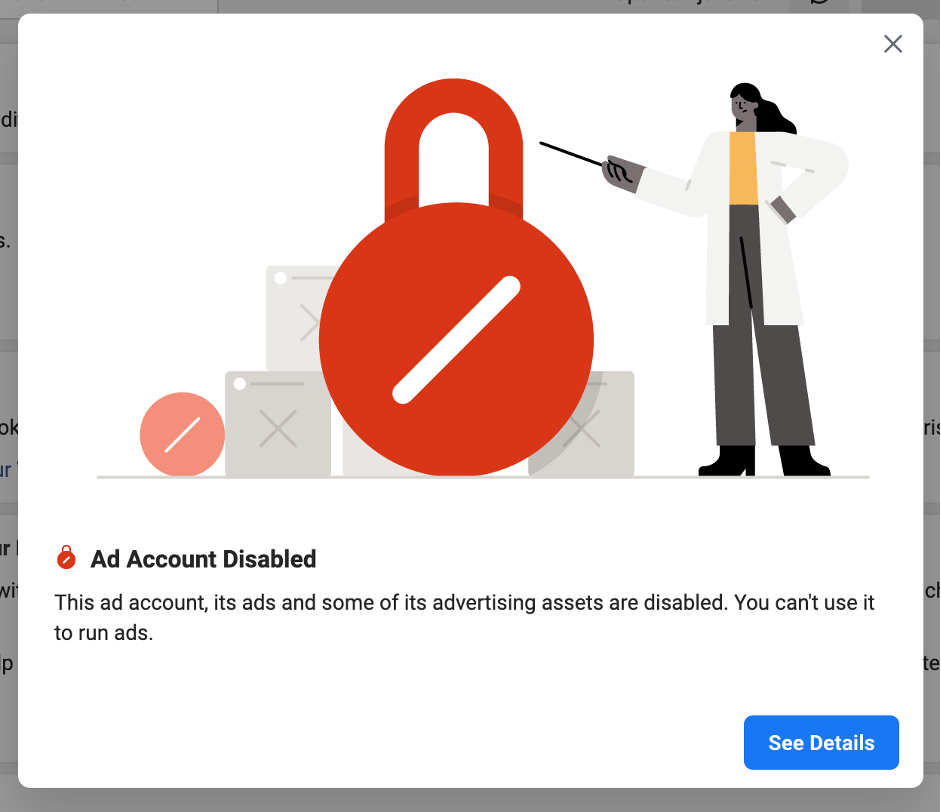
    So the moment you see that dreaded notification (like the one shown below), you need to take action straightaway:


    Step 1: Raise a Review Request

    The first thing you want to do is “See Details” to know the reason for your Ad account disapproval. Typically, it will just be shown as ‘Policy Violation’ (sometimes it could be a payment declined issue, so you want to make sure what the issue is before taking further action).

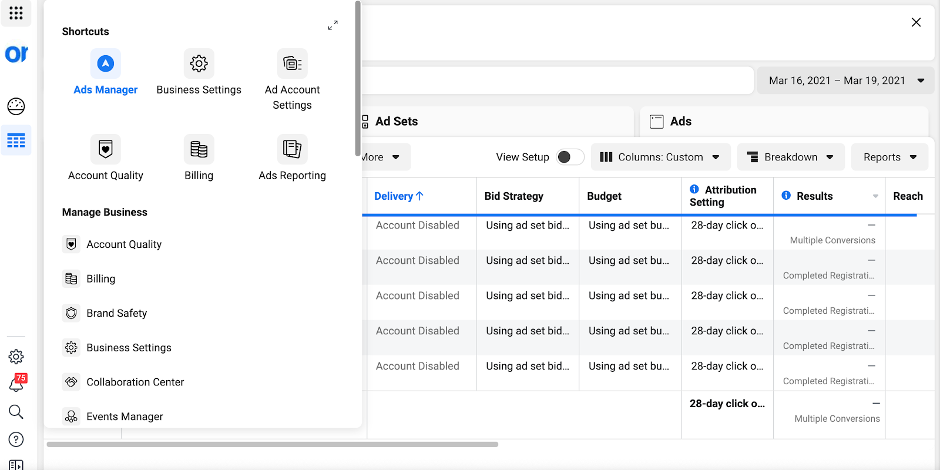
    Another way to do this is to go to the “Account Quality” section and then select the account in question.

    The best thing to do here is to “Request a Review”. Simply follow the steps to submit a review request to Facebook.

    You will be asked to write an explanation as to why your account should be re-activated. 

    From my experience dealing with disabled accounts in our agency, it is best not to get into too much detail here. You may just want to mention that you are sure that none of the Ads violate any Ad policy and all the creatives and landing pages follow the policy as well.

    It always helps to mention that you have gone through the entire Ad policy as given in <copy paste the Ad policy link> and that you are sure that none of the Ads are in violation of any of the policies mentioned therein. Once you’ve mentioned that, request them to re-activate the Ad account as soon as possible. 

    Always remember to use a friendly tone and not sound too irate or angry. That would never help.

    Now most people just submit a review request and wait for Facebook to take action. 

    The problem is Facebook can sometimes take as long as a week to get back to you for Ad account review cases. But that wouldn’t help if you have Ads running for a client or your own business. You definitely want the Ad account to be up and running much faster, within an hour or a couple of hours at max.

    To help with a faster review process, it is best to reach out to Facebook Chat support as shown in Step 2.


    Step 2: Connect with Facebook Chat Support

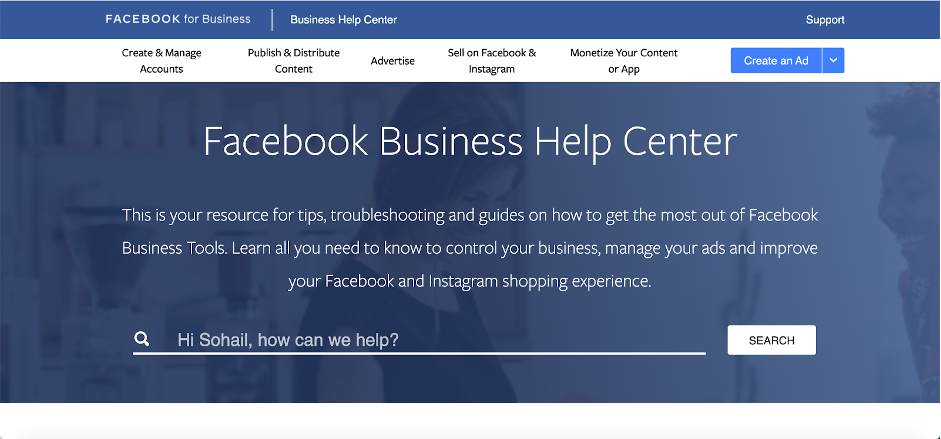
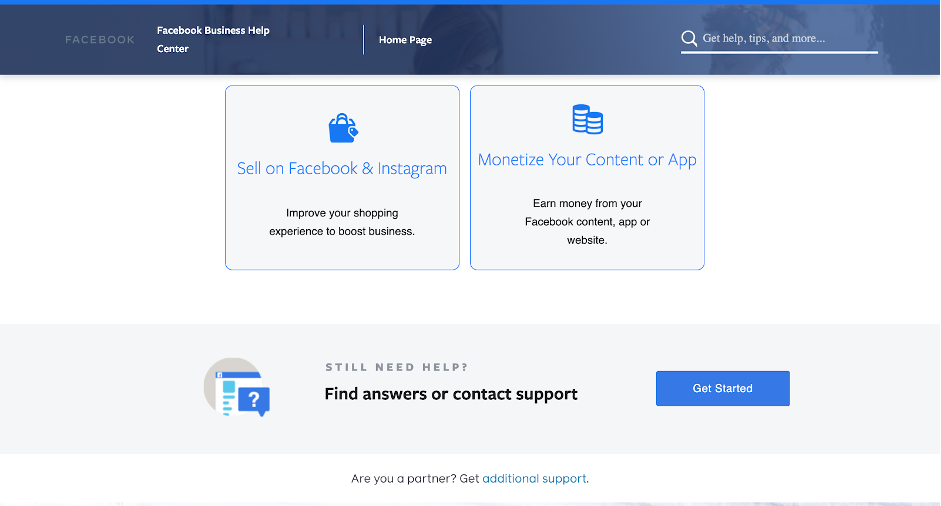
    Go to Facebook Business Help Centre: https://www.facebook.com/business/help

    Scroll to the bottom of the page till you reach the “Still Need Help” section shown below and click on “Get Started”:

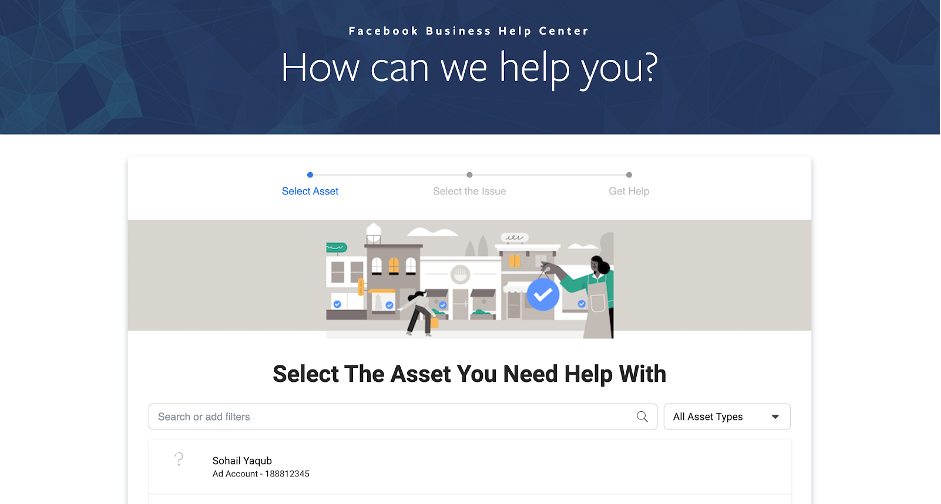
    The next page will ask you to select the asset you need help with. From the list of assets, select the Ad account that has been disabled:

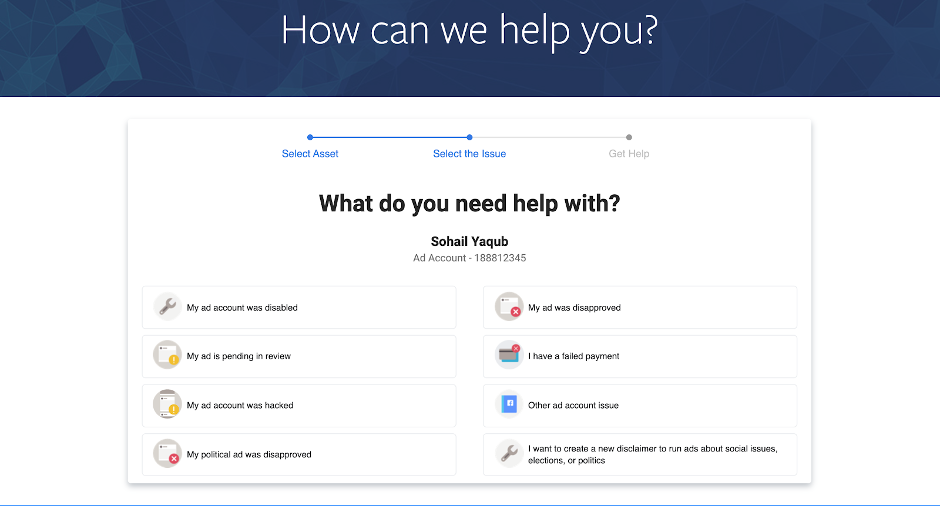
    On the next page, select the “My Ad account was disabled” option:

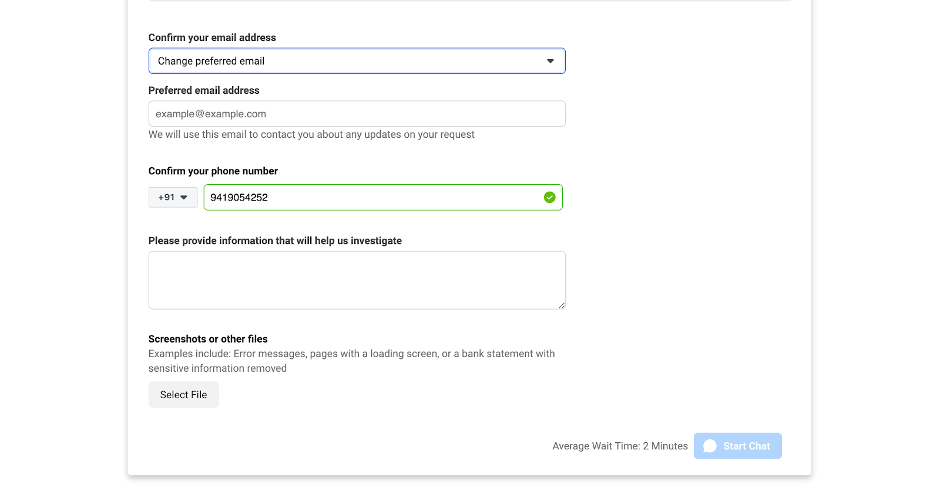
    Next, enter your email ID & phone number (usually these auto-populate) and write a brief explanation which can be the same as your review request appeal.

    Once you have entered these details, you should see the “Start Chart” tab at the bottom of the page get illuminated (it will also show the wait time). That is what your aim is. Normally it is very difficult to get hold of Chat support from Facebook. Facebook doesn’t advertise it as well for obvious reasons.

    So the whole idea of doing this step is to get hold of a Facebook support rep who can start looking at your issue straightaway. Remember, you are doing this so that you don’t have to wait for days/weeks to get your account reactivated. 

    At our agency, we have had accounts activated within 30 minutes by following this process.

    If your account has been incorrectly disabled, you are almost guaranteed to get it back through this method. If, however, you come across a support rep who is not sure and asks you to wait for a day or two while they look at it. Thank them and log out of that chat.

    Then start another chat session by following the exact steps mentioned above. 

    Just like all services there will be some support reps who may not help you straight away, but there will be a few who will look into resolving your issue on that chat itself. All you have to do is find them (and if you are lucky you’ll get them within the first or second attempt).


    Step 3: Reach out to your Facebook Marketing Expert

    If Step 2 doesn’t work or you were asked to wait for a day or two by the Chat Support Representative, the next thing you can do is reach out to the Facebook Marketing Expert that may have been assigned to you.

    Facebook assigns a Marketing Expert to most Ad accounts. You would typically receive an email from the expert asking you to schedule a call with them to go through the performance of your ad account. 

    If you have already connected with them, then this is the best time to make use of that expert. Write to them about your Ad account being disabled and ask them for their help to get it re-enabled. 

    A lot of Facebook Marketing Experts will step in and help you. Unfortunately, like a lot of other businesses, the value of your account with Facebook could make a difference here.

    One of these 3 steps should help you get your Ad account reactivated sooner than later. If however, you still receive a reply from Facebook citing policy violations, you would need to take a closer look at your product/ads/ landing page(s) and make all necessary changes to run ads that fall within Facebook’s Ad policy.

    Remember, if you try and run the same ads from another ad account, you risk losing your Business Manager altogether.

    Did these steps work for you? Or have you tried any other step that helped you enable your Ad account faster? Let me know in the comments below. 

    Good luck!!

  • 13 Overlooked Hacks to Turn Your Facebook Page into a High Converting Business Tool in 2021

    13 Overlooked Hacks to Turn Your Facebook Page into a High Converting Business Tool in 2021

    So, you’ve got your Facebook business page up; you’ve got some likes (mainly cause you asked people); few page visits and few impressions on photos and videos. Maybe you even spent a few dollars on a Facebook ad but you are just not getting enough traction and click throughs. Facebook success stories aren’t helping either.

    It’s time to direct your energies on optimising your Facebook page. Because therein lies a well of business opportunities. Despite controversies with data privacy policies, Facebook has shown an increase of 13% in its daily and monthly users compared to the previous year. It is, undoubtedly, still the world’s largest social media juggernaut.

    And that’s why, it is a vital cog of your marketing strategy – a perfect platform to showcase your value-add, respond to customer queries, generate leads and increase sales.

    IN THIS BLOG

    1. Facebook Marketing Basics
    2. 13 Hacks – Quick and Dirty on getting your FB page to do the work for you
         i. Ensure your NAP is absolutely accurate
        ii. Choose the most appropriate template
        iii. Connect WhatsApp to your Facebook page
        iv. Use a persuasive Call-to-Action button
        v. SEO Essential: Long Tail Keywords 
        ⅵ. Backlink your Facebook page from your other digital assets
        ⅶ. Reviews make a difference
       ⅷ. Add visual imagery and more of it
        ⅸ. Facebook Live
        ⅹ. Different time zones need a scheduler
        ⅺ. Show value first 
        xii. Optimise your Facebook page settings
        xiii. Optimise Facebook Messenger
    3. In Conclusion


    Facebook Marketing Basics

    – Your Facebook page is not your website, especially for B2B businesses. It is best not to substitute it for your website either. This platform is mainly used to expand reach, tell a story and announce fantastic offers and deals. Your website is a whole lot more comprehensive.

    – Consider your Facebook Page as a micro-site within Facebook’s multiverse of millions of pages. Essentially, your page provides highlights of your products or services and your brand.

    – Search Engine Result Pages (SERPs) often feature social media accounts in top rankings. A well-manicured Facebook page and presence on other social media platforms can certainly boost the chances of more people finding your brand on search engines such as Google.

     – Consider fine tuning your search engine optimisation process when you post on Facebook. Important keywords related to your brand should be well distributed in your Facebook page and your posts.

    – Facebook offers a bundle of features that help optimise Facebook business page. For instance, Location Pages, Messenger, Boost, cross linkages to Instagram, and WhatsApp. Optimizing these to improve your design, layout, and functionality can help you turn your Facebook page into a high-converting business tool. In the following sections of the blog, we will guide you on how to use them – quickly and effectively.


    13 Hacks

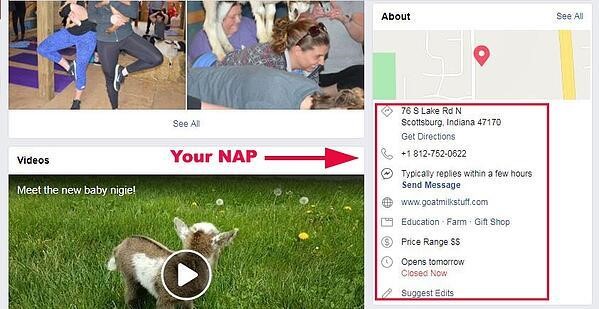
    1. Ensure that your NAP is absolutely accurate
    NAP is Morse code for Name, Address and Phone Number. You have perhaps already listed your business on several online yellow pages and submitted your NAP. It’s not any different on Facebook. However, you have to ensure that all the details in your listings, including Facebook, must be absolutely consistent. Else, online search results for a particular product or service may not include your business within the top rankings. 

    Check and double check that all spellings, numbers, and abbreviations are the same through all your listings.


    2. Choose the most appropriate template
    When you first set up for your Facebook business page, you are presented with several options to choose the most appropriate template for your business. These include:

    – Standard page
    – Business
    – Venues
    – Movies
    – Charity
    – Politicians
    – Services
    – Restaurants and cafes
    – Shopping (This template embeds the “Shop” button on your Facebook page)
    – Video page

    These templates have been found to be most functional for all 10 business types listed above.

    When you choose a template, you will notice that there are already pre-positioned tabs and buttons. These can be edited and customized as much as you want till you are satisfied with the appearance and efficiency of your page.

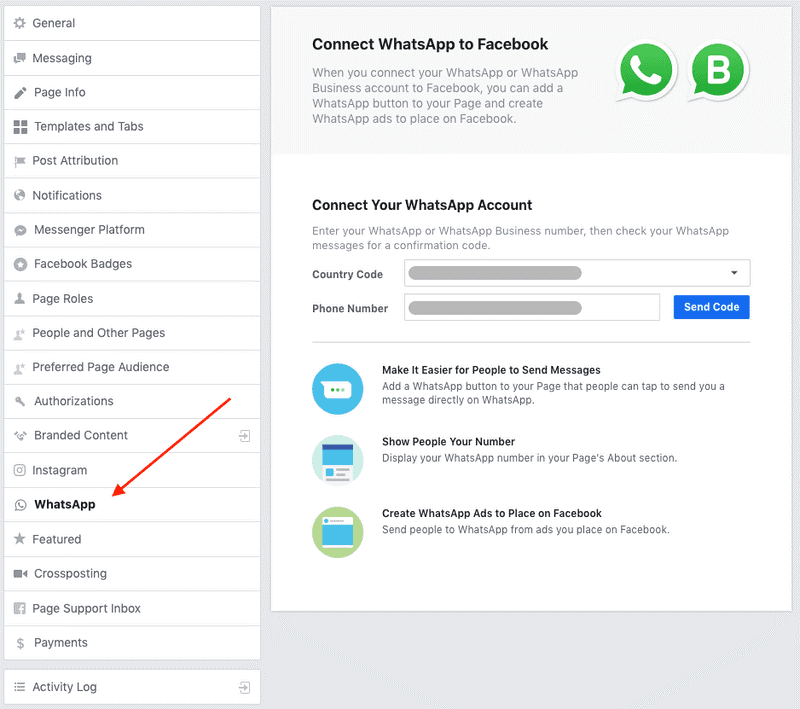
    3. Connect WhatsApp to your Facebook page
    Facebook now allows you to integrate your WhatsApp business account to your Facebook page. This is good because WhatsApp is most commonly accessed by people, it is a quick, convenient and effective way of managing your brand’s community and staying in touch with customers.  Adding the Whats App button to your Facebook page can add to the ease of access and help customers immediately contact you. This can prove to be very strategic to your lead generation efforts. 

    It’s a good idea to add the WhatsApp button to your Facebook ads as your call-to-action.


    4. Use a persuasive Call-to-Action button 
    All the jazzy images, high quality videos and attractive content will not yield substantial results, UNLESS you let your customers know what to do next. That’s why the need for a clear Call-to-Action (CTA) button. So that your visitors know exactly which action to perform in order to avail of your offers and services. And the good news is that you can have a CTA button built into your Facebook page or ad. 

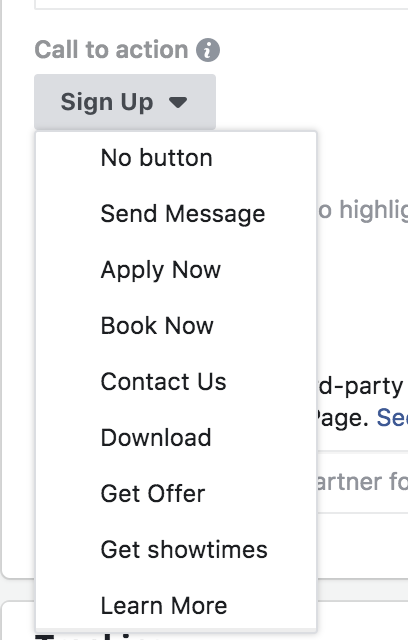
    Typically, the CTA button on your Facebook page will be located below your cover art and on the right side. You can choose from Facebook’s extensive range of CTA buttons – in fact from 20 different options. 


    The top most commonly used CTA buttons include the following.

    1. “Send Message”
    2. “Apply Now”
    3. “Download”
    4. “Learn More” 
    5. “Contact Us”

    The buttons you use must be obviously and directly aligned to your business goals. 

    CTA buttons to build and expand awareness: At this point, customers don’t know your brand. Through your Facebook ad, you wish to establish your presence and increase familiarity with your brand. Good CTA choices…

    – “Download”
    – “Learn More”
    – “Apply Now”

    CTA buttons to encourage your customers to consider your brand: Through your Facebook ad, you now seek to engage with audience that is most likely aware about your brand. You now want them to consider your product or service as a potential and viable solution. Good CTA choices… 

    – “Download”
    – “Contact Us”
    – “Learn More”
    – “Book Now”

    CTA buttons to convert: Decision making time. Your customers are aware of your brand and in all likelihood about your competitors’. To help take the decision in your favour, focus on the content of your ad and use one of the following CTA choices.

    – “Message Us”
    – “Apply Now”
    – “Get Quote”
    – “Subscribe”
    – “Sign Up”
    – “Buy Now”

    CTAs are really the clincher. Ensure that your CTA makes it easy and convenient for the customer to either ask for more information or buy; and that they are not misleading or confusing.

    5. SEO Essential: Long Tail Keywords 
    Keywords are crucial for search engines. Better relevance of keywords in your content leads to greater chances of top rankings in search engine results pages, especially in Facebook search. So, recognising and using these combinations of keywords can offer a significant advantage to increase the visibility of your brand in Facebook.

    But what the heck is a long tail keyword?!

    Long tail keyword is SEO speak for search terms which are longer and more specific. Remember, keywords need to be optimised and distributed throughout your content. 

    For instance, let’s say you want to search for “sportswear”. Now, modify the search term to “sportswear for winter sports” and then, once more to “sportswear for winter sports for athletes”.  You will immediately notice the differences in search results. With each modification of your search terms, the results will vary. It’s a good idea, therefore, to find out what your customers search for and the keywords they use. Then, customise your content to make enhance relevance and improve searchability.

    With each modification of your search terms, the results will vary. It’s a good idea, therefore, to find out what your customers search for and the keywords they use. Then, customise your content to make enhance relevance and improve searchability. 

    Long tail keywords can create better engagement and increase conversion rates which will help you to boost your page. You must use these keywords in your ads, descriptions and posts.

    6. Backlink your Facebook page from your other Digital Assets
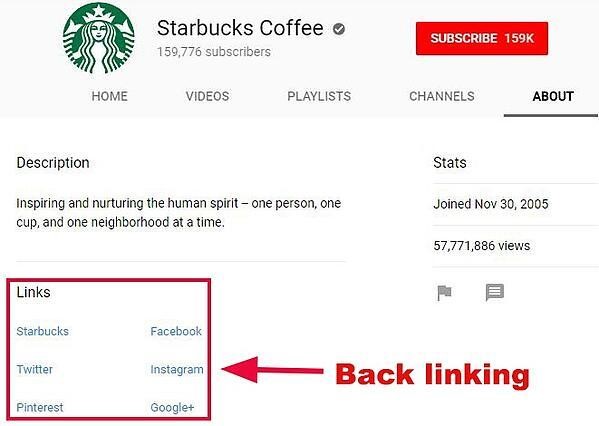
    What’s backlinking? Its when you link your Facebook page from your other social media platforms such as Instagram and Twitter as well as your website. As more links from these digital assets connect to your Facebook page, it will rank higher in search engine results. 

     Link your Facebook page from all other accounts, including your virtual business card and profile.


    7. Reviews make a difference
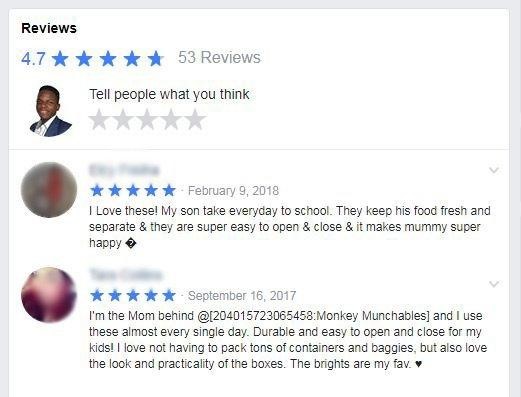
    Whether your product is a blockbuster or not, adding reviews to your Facebook page allows you to put a finger on the pulse of your customers. Reviews are the social proof of your credibility and trustworthiness. A study by Bright Local showed that consumers read 7 reviews on an average before buying from a business and 85% of consumers trust them on par with personal recommendations.

    Therefore, the more reviews you get, the better it is for your online business. Besides the fact that reviews can actually boost your sales, they also serve to enhance the chances of your page appearing in search engine results.

    And the funny thing is that reviews are not too hard to get! Bright Local also pointed out in the same study that 68% of consumers are willing to give a review to a local business. For a small business or a new entrepreneur, reviews can be the game changer.

    Enable “Add Review” on your Facebook page to ask your customers to review your product or service. 


    8. Add visual imagery and more of it
    We know we learn much better from videos rather than from a photo or content. It’s a major reason for brands shifting to video ads on Facebook.

    A study by Nielsen in collaboration with Facebook showed that the moment a video ad was shown, it immediately increased ad recall, purchase decision and brand awareness.

    This lift happened even before one second of the video was played. What this means is that people who didn’t even complete the video were impacted by it. The longer the ad was viewed, the lift increased. Data also showed that even video views less than 10 seconds were effective enough to influence brand awareness and purchase decisions.

    The final mind-blowing fact is that people gaze at videos 5 times more than at a static post.

    Create shorter videos and measure the value from “Likes”, “Comments” and “Shares”. When creating your video content, keep in mind that the entire video, from the first frame to the last, drives value.

    9. Facebook Live
    There are several ways to get your message out on your Facebook page – content, images, videos, slideshows, data charts and graphs, etc. But have you ever tried Facebook Live? If you haven’t yet, then we have some very compelling evidence for you.

    Of all the various types of posts on Facebook, Live video has been found to have the most impact and reach. To give you a better perspective, firstly, people watch it three times longer, and secondly, the number of comments increases by 10 times when compared to regular video

    One of the advantages of live streaming on Facebook is that the event is placed at the top of the Facebook News Feed and Facebook also sends notifications to your potential audience. 

    You can also easily either schedule a broadcast or go Live! Just click on the Live Video button. 

    You can use Facebook Live for product demos, events like product launches, back stories and announcements. Facebook recommends at least 10 minutes of live streaming as the longer you are live for, the higher are the chances of people watching your event.

    10. Different time zones need a scheduler
    Let’s face it! The moment you take your business online, your customer base becomes global. That brings in different time zones to the equation of when is it most effective to upload your content. It’s a given that the quality of your posts matters a great deal to keep a global audience engaged, but it is not easy to produce top class content twice a day, every day. 

    And what do you do about people who live in time zones away from you? Take advantage of Facebook’s Post Scheduler.

    Create a few posts and customise each one depending on the geography of your audience. Then, queue all the posts by using the “Schedule Post” button. Facebook will automatically display the posts at time slots you assign in the scheduler.

    11. Show value first
    What does that mean? You can’t just put any content together and post it on Facebook for your viewer to consume. In simple terms, deliver content that is beneficial to your viewer. Check out Dogspot who provide a variety of services like pet day-care, salons and grooming parlours as well as vets under a single roof. They frequently hold Facebook LIVE sessions with experts in their fields for the pure benefit of their viewers. With no sales pitch in these sessions.


    A good rule of thumb is to provide value to your viewers, without baiting them, at least twice before you pitch to them. A proper plan in the form of a content calendar will go a long way in keeping your viewers hooked and you prepped. 

    12. Optimise your Facebook page settings
    You can customise almost every aspect of your Facebook business asset to ensure that your audience gets the best look and feel of your brand, product or service. And it’s a good idea to do so, as everything you showcase on Facebook translates into a potential customer touch point. This begins with the name of your Facebook page and runs down to integrating your other social media platforms.

    – Here are some best practices we strongly recommend.

    – Collect your Vanity URL

    – Tab re-ordering based on what the viewer would like to see first

    – Shopfront to buy directly from Facebook’s “Shop”

    – Offer creation that lets you highlight offers and makes it easier for the viewer to claim

    – Events section should get a special mention organically by Facebook based on geography and friends of people who are going

    – Connect Instagram feature that lets you moderate posts on Instagram from Facebook

    13.  Optimise Facebook Messenger

    The Facebook Messenger has evolved from a simple messaging application meant for chatting with friends and family to the one that brands use to communicate with their audience. In fact, in our experience has shown that Messenger, not News Feed, offers the opportunities for the best Facebook hacks.

    The advent of the omnipresent chatbot erased the need to open apps, call people or online searches. So, if you still haven’t customised Messenger to work for you, let’s do it right away!

    Instant Replies
    In our real-time world, quick responses are the order of the day. But what if you are not online? That query or purchase decision could go unnoticed for a considerable period of time and may turn off your customer. Not any longer!

    You can use Facebook’s Response Assistant so that your customers always receive a response whether you are online or not. The Response Assistant will send a greeting text if someone is about to send a message to you. This text can also be customised to send instant responses to incoming messages. Here’s how to do it:

    1. Go to your Facebook Page Settings
    2. From the menu on the left, select “Messaging”
    3. Scroll to Response Assistant
    4. Use the toggle switches to turn on “Yes” for “Send Instant Replies to anyone who messages your Page” or turn on “Yes” for “Show a Messenger Greeting”
    5. Click “Change”
    6. Write your message(s) appropriately
    7. Click “Save”

    Calibrating your AWAY messages
    Facebook actually has a rating scale to let visitors know how quickly you respond. And you want that rating to be as high as possible, green being the highest, implying “Very responsive to messages”.

    But it’s also not possible to be on Messenger all the time. Somebody’s got to run the business too?! So here’s how to make Messenger work for you. 

    1. Go to your Facebook Page Settings
    2. From the menu on the left, select “Messaging”
    3. Under Response Assistant, use the toggle switch to turn on “Yes” for “Stay responsive when you can’t get to your computer or phone”
    4. Click “Change”
    5. Now, write a message which will inform the user an approximate duration to wait for your response
    6. Click “Save”
    7. Under “Stay responsive when you can’t get to your computer or phone”, click “Change”
    8. Then, click ”Schedule”
    9. Choose your time zone and click “Add Time”
    10. Enter the times when you will be away from Messenger
    11. Click “Save”

    Some Messages Need to be Responded to Privately
    Of course, more conversations around your page are great to show community engagement. But it’s also equally true that not all conversations have to be in the public domain. Issues related to customer complaints or order fulfilments are best dealt in private. 

    So, click “Message” instead of “Reply” under the original post. You can now deal with the situation privately on Messenger and at the same time a public notification will announce that you have responded privately. This helps to let people feel that you are ignoring or not responding. 

    Launch Your Own Bot!
    Chatbots are a very handy automated tool. They can book hotel reservations, answer specific questions, bring up your favourite playlist and the list goes on! Chatbots may not always be necessary for a business, but there’s enough to consider whether a bot could help your brand to answer product or service related questions. 

    If you don’t know how to code one, then rest easy as there are many resources online which you can use to build your own.

    Use Messenger to Sell
    Thus far, you have set up your Facebook Messenger to respond to basic queries regarding your brand and to deal with customer service. But did you know that you can also sell on Messenger? 

    When you use paid ads or sponsored messages, you can send them to anyone who has an open chat with you. So, even as you are responding, you can send an ad to the person to let them know about a new update or value-add. People who subscribe to your Messenger are like the entries of your email list to whom you can send new information, do surveys and give glimpses of your new promotions, among others.

    In Conclusion:
    As we step into 2021, with more and more businesses going digital its almost critical for business to leverage social media platforms in all their glory. Globally, thousands of businesses rely on their Facebook page to promote their business and generate sales. It’s a no – brainer that a well optimised Facebook Business page can be very useful to grow your brand’s reputation and profitability. If you’re not doing it already, start today. If you are, ensure you’re getting to use all its features to your advantage. 

    Have you tried any of these hacks before? Did it work for you? Let us know in the comments below.

  • How to adapt your market strategies during an economic slowdown?

    How to adapt your market strategies during an economic slowdown?

    In the middle of difficulty lies opportunity. – Albert Einstein

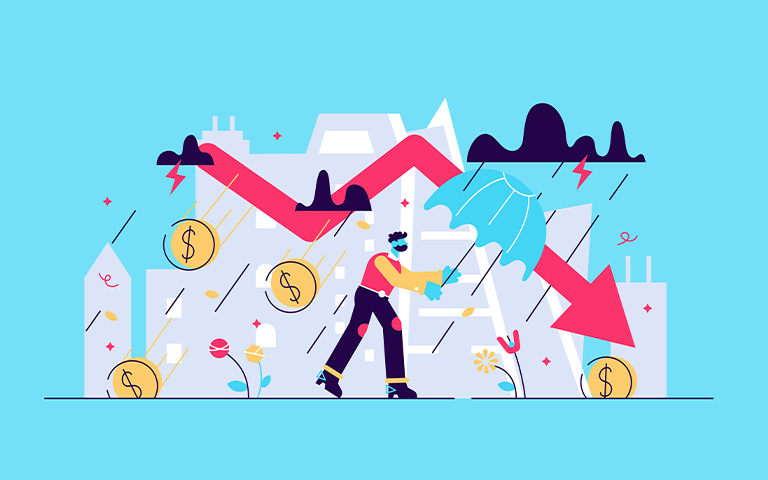
    In case you haven’t heard and read about it already, it is official: we are in recession. According to The World Economic Forum, the shock to the global economy from COVID-19 has been both faster and more severe than the 2008 Global Financial Crisis (GFC) and even the Great Depression. As we grapple with uncertainty and adapt to a changed marketplace, one thing remains clear: our businesses can’t afford to slow down.

    That’s why all across the world, restaurants have adapted quickly to set-up online ordering and delivery services, gyms and yoga studios are changing their conventional operation methods and live-streaming at-home workouts. Also, conferences, events etc that havent been cancelled have gone completely virtual and most brands have adapted their marketing approach and found innovative ways to retain their customers. Most of these businesses have two things in common:

    1. Digital has become their lifeline

    2. They have swiftly adapted to meet the challenges of the unprecedented market situation caused by Covid-19, and more importantly, they haven’t gone completely dark

    IN THIS BLOG

    1. How companies lost their “share of voice” in historic recessions?
    2. How consumer behaviour changes during a recession?
    3. How to recession proof your marketing strategy?
         i. Niche market analysis 
        ii. Advertising tactics that deliver results
        iii. Your customers first
        iv. Be sensitive and innovative
        v. Double your content marketing efforts

    How companies lost their “share of voice” in historic recessions?
    It wouldn’t be wrong to think that most businesses across the world would cut down on their advertising spends during this period. According to Marketing Week, 86% of marketers are now delaying or reviewing their marketing campaigns. But to understand why this strategy wont work, we only need to look at the examples of companies that went ‘completely dark’ in previous recessions and ceded ground to their competitors.

    During the 1990-91 recession, Pizza Hut and Taco Bell took advantage of McDonald’s decision to drop its marketing budget. Pizza Hut’s share grew by 61% and Taco Bell’s by 40% and McDonald’s reported a drop of 28%.

    In the more recent 2008 recession, Amazon’s share grew by 28% as it increased its ‘share of voice’ through marketing and focusing on innovation, most notably through new Kindle products. The consumers perceived Amazon as an innovative company that offered low-cost alternatives when there was a cash crunch all around.

    So what is a brand’s ‘share of voice’ and what happens to yours when you decide to go dark during a recession? 

    It is the measure of the market your brand owns, compared to your competitors. It shows how much you dominate the conversation in your industry. The more market share you have, the greater popularity and authority you are likely to have among users and prospective customers. While share of voice referred to a brand’s share of paid advertising, it now has a  broader definition that includes various elements of digital marketing, including social media and keyword traffic.

    When a recession happens, other brands pull their marketing budgets, which means your share of voice in that market can only increase. Typically, a 15% share of voice means that you have a 15% market share. Suppose your competitors halve their Ad spends during a recession, it means with the same marketing spend you would now get 30% share of voice. In addition, you also get to project an image of stability to your consumers when you advertise during challenging times.

    On the other hand, brands that deeply cut into their Ad spends and communications budgets in a down period find that  the cost to regain share of voice in the market, once economy turns, is usually four or five times as much as the cuts saved.

    Moral of the story – when a recession hits, do not reduce your Ad spend, this is the time to gain more visibility and increase your market share.

    How consumer behaviour changes during a recession?
    As soon as the global markets start sending those worrying signals, a certain kind of people begin to dominate conversations. For instance, those that have seen their savings or retirement funds wiped out in past recessions. Their narrative – economic downturn, falling markets and job losses will erode buying power and make consumers cautious. Predictably so, consumers at large begin to prioritize consumption by sorting products and services into these four categories – as identified in the Harvard Business Review:

    Essentials are necessary for survival or perceived as central to well-being

    Treats are indulgences whose immediate purchase is considered justifiable

    Postponables are needed or desired items whose purchase can be reasonably put off

    Expendables are perceived as unnecessary or unjustifiable

    Companies that put customer needs under the microscope, take a scalpel rather than a cleaver to the marketing budget, and nimbly adjust strategies, tactics and product offerings in response to shifting demand are more likely than others to flourish – both during and after a recession.
    – Harvard Business Review

    How to recession proof your marketing strategy?
    We looked at why you don’t want to put the kibosh on your advertising during a recession. We’ve also seen how consumers may adjust their buying behavior during an economic downturn. How do you then make sure that your advertising efforts don’t go to waste in a changed market?

    According to Millward Brown, it is crucial to question what each element in your marketing plan is intended to achieve. How will it encourage brand loyalty? What barrier to purchase does it address? Will it make the brand seem worth paying more for, or will it create a belief that this is a cheap brand?

    A majority of brands 10+ years ago were not utilising digital marketing the way they are today. The whole marketing approach has changed and become more data-driven which enables you to pin-point where each advertising dollar should be spent. Audience data analytics along with relevant Ad placements would provide you with valuable insights and more efficient marketing strategies.

    Here is what you need to focus on:

    1. Niche Market Analysis 
    As a brand you need to dive deep into understanding your target customer and how their buying behaviour would change during a recession. It’s crucial to understand how customers reassess priorities and reallocate funds during a downturn. You need to tailor this framework for your own industry, to understand how buyer behaviour will  change depending on whether your offering is an essential, a treat, postponable or expendable.  Use that information to devise a marketing strategy and messaging that resonates with your audience.

    2. Advertising tactics that deliver results
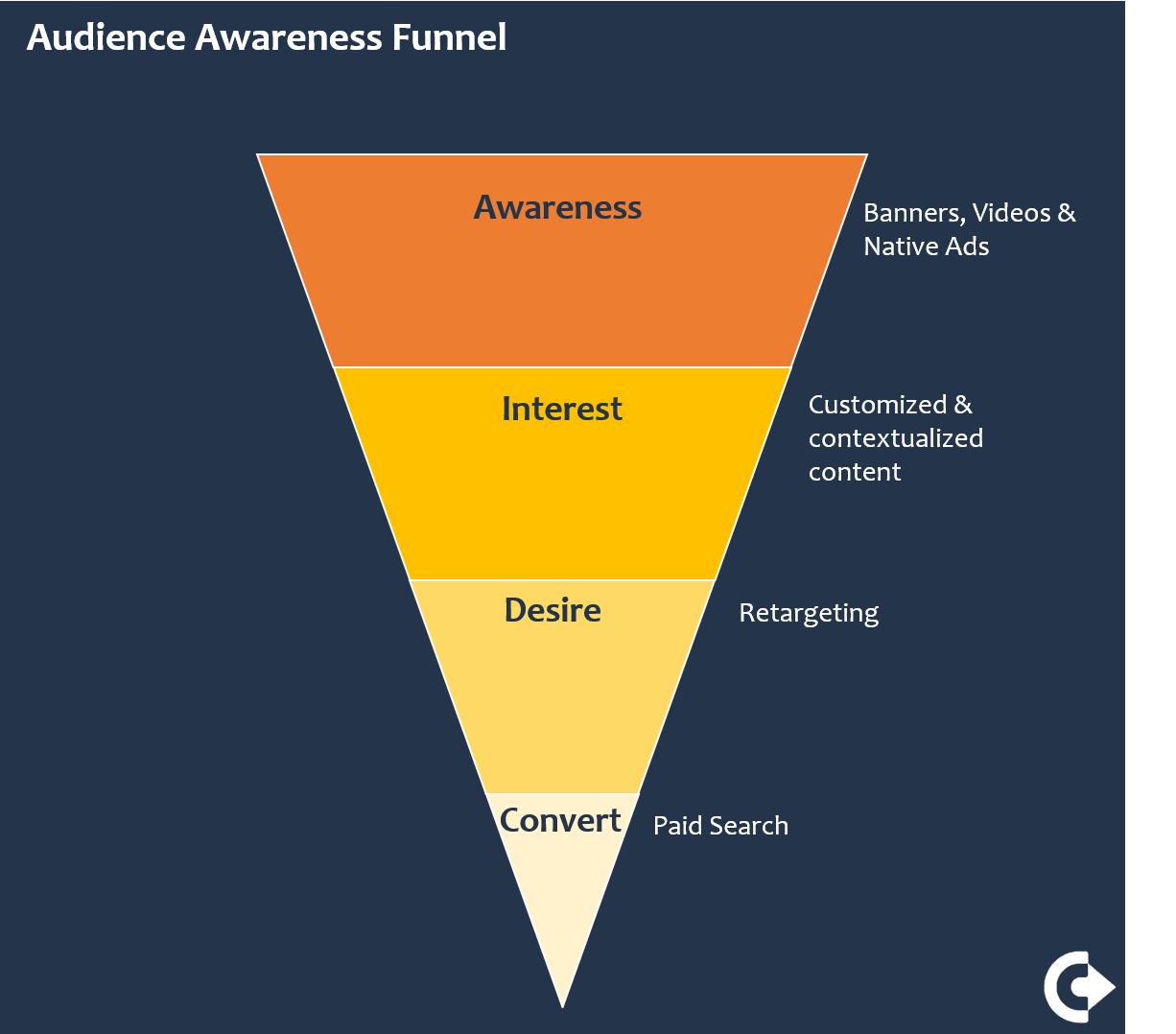
    When the market is slow and sales are tough to come by, a more strategic look at your advertising plan can come to your rescue. Digital Ad solutions can reach consumers at all stages of their awareness and consideration cycle:

    a. Banner Ads, video and native ads build awareness

    b. Custom content communicates a story to your audience

    c. Retargeting keeps your brand on top of their mind

    d. Paid search enables you to reach those who are eagerly looking for solutions


    During a market slow-down, concentrate your ad spend on those tactics and placements that will drive maximum results and give you the best bang for your buck. For instance, if you think advertising to cold traffic usually lowers your ROI, focus your Ad spend more on Retargeting or Paid search, so as to show your ads to mostly those who are still looking to buy.

    3. Your customers first
    The 80-20 rule applies to most businesses. It means 80% of your business comes from 20% of your customers. These 20% customers can become your business’s lifeline during this time. Ask your customers what they need from you. It is crucial that you communicate with them to retain their business. And by ‘communicate’ we mean using multiple platforms to get your message out. Just dropping an email may not be enough. A lot of businesses are reaching out to their customers and offering alternative solutions or innovative ways to keep them engaged.

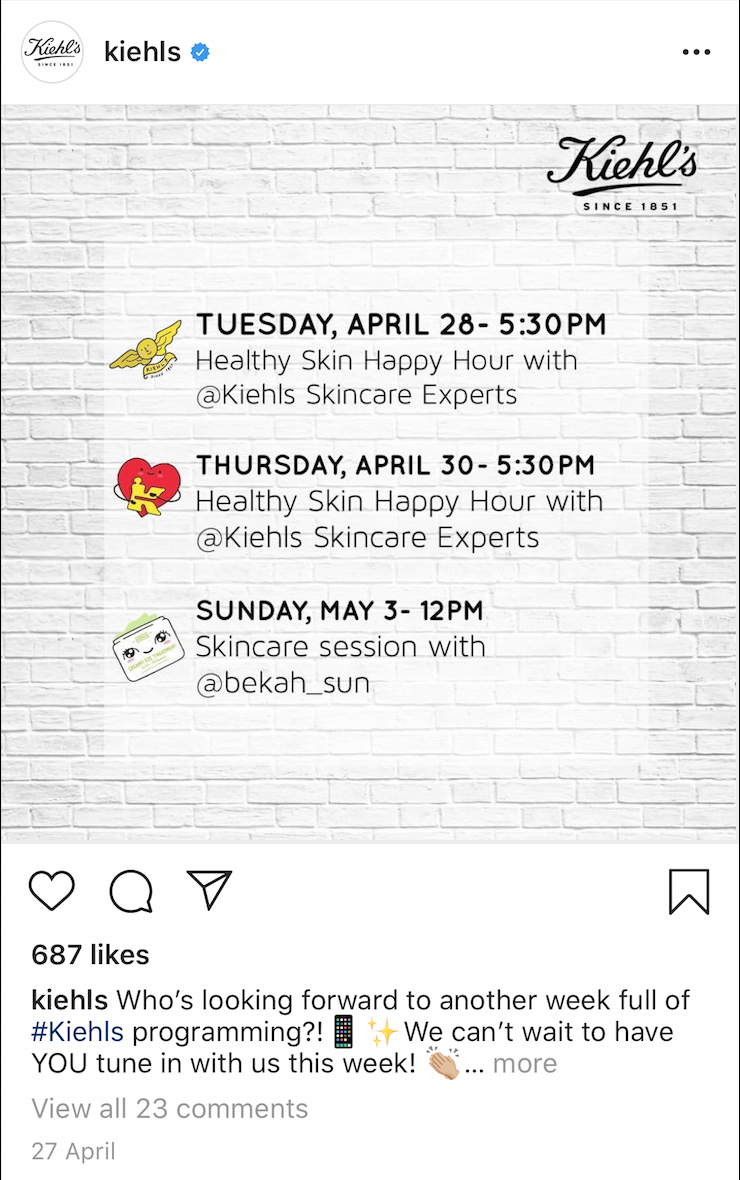
    Kiehl’s immediately began communicating ‘home-delivery’ solutions to its customers through Emails, SMS and their social media profiles since all their stores had to be shut due to the Covid-19 lockdown. They also started weekly Insta Live sessions with their Skin care experts to help their customers with DIY (do it yourself) tips and in turn stay on top of their mind.


    4. Be sensitive and Innovative
    The campaigns you ran before the pandemic started may not work now. Think about whether your messaging needs to change to be sensitive to the overall mood of your consumers. Everyone is living through unprecedented times with lockdowns, lay-offs and no clarity on how the situation will unfold. 

    This is also the time to consider your core values as an organization. Be innovative if there is an opportunity. Can you pivot your product or service to help your customers? Can you address or solve their pain points? People will always remember who helped them at these times. At the same time, they will remember who tried to profit by preying on insecurity. 

    5. Double your content marketing efforts
    While you may not advertise on all paid media platforms at this time, it could be a great time to focus on Content marketing and SEO. Both Content marketing and SEO are long term efforts, so step into the game now to reap the benefits as and when things start getting back to normal.

    A well devised content marketing strategy should focus on the core value you provide to your customers, and offer timeless solutions to their problems. Think how you could help your customers during and after the economic downturn. What solutions could they be actively searching for? Creating long-form blog posts, e-books, ultimate guides and templates helps build authority in your industry and positions you as an expert.

    While creating content ask yourself:

    a. What keywords do you want to rank for 8-12 months from now?

    b. Is there a product or service niche that you want to be known for?

    c. How can you repurpose your existing content to make it SEO friendly?

    d. What are your core competencies?

    e. How and what can you offer that’s different from your competitors?

    In Conclusion
    While it isn’t clear how long this pandemic-induced recession will last, one thing brands can’t afford is to ‘go dark’ and lose their market share in short or long term. Whether you are a big, well-known brand or a small one, you need to find ways to reach out to your customers, maintain or even increase your marketing spends during this period. A recession should be no reason to stop your advertising or marketing efforts. Like many successful organizations today have, turn towards the astute, money-wise strategies the digital marketing world has to offer. Outside that door you are certain to find opportunities to reach out, maintain connect, and sell to your target consumer.

  • How Webinars Can Help in Times of Uncertainty?

    How Webinars Can Help in Times of Uncertainty?

    Utilizing webinars in a VUCA world

    The world we live in today is an uncertain, fickle-headed place. It’s the truth we’re all finding ways to come to terms with as the Corona story unfolds. And while the Corona issue is an obvious contributor, there are several other factors that make our world today rather VUCA (Volatile, Uncertain, Complex, Ambiguous).  To name a few – the diminishing line between business and political leaders, the maddening pace of technological changes, increasing need to access global talent, or the need for all things “instant” by customers & employees. 

    So, what do these uncertain times demand of modern-day businesses? How do businesses stay profitable in such an environment? By ensuring that their communication channels with employees, investors, and customers stay open – at all times and in spite of odds. 

    Enter Webinars. As a medium to establish real-time, face-to-face contact with stakeholders spread across the world; to utilize creative ways to build brands, generate leads, even sell. As a medium to build deep, meaningful relations. 

    Admittedly, the webinar is first a marketing tool. And a great one at that. While there are many marketing tools that could be used at a time like this (like pay per click or email marketing), webinars come in as the #1 choice because they allow you to demonstrate your product, service or idea to a live audience. The trick is, of course, to be able to do it right.

    Read below to see what a webinar done well means, how that can be the instant answer to mitigating business uncertainties and branching away from a single business model.

    Before we dive in, here is a quick statistic by ON24

    – 89% hosts agreed that the webinar is their platform of choice to showcase and grow their business

    – 95% respondents agreed on webinars as a key to their lead generation and marketing efforts

    – 75% reported that they use webinars to build their brand

    – 76% achieved more leads by running webinars

    – 69% respondents scaled up their market through webinars

    IN THIS BLOG

    1. Why do businesses need to adopt webinars today?
    2. Types of webinars
    3. Top 8 business goals you can achieve through a great webinar (with real life stories and best practices)
        i. Lead Generation
        ii. Sales
        iii. Branding
        iv. Creating value
        v. Events
        vi. Training
        vii. Education
        viii. Product Demo
    4. In Conclusion

    Why do businesses need to adopt webinars today?

    Here are a few ways in which webinars impact the 3 big levers of your business.


    Types of webinars
    Classified simply on the basis of how you host a webinar, there are 2 variations.

    Live
    A live webinar is an online meeting or a presentation held in real time. The presenter or the host connects with numerous attendees from different locations. It’s big plus lies in giving its attendees the ability to interact, exchange body language cues, and therefore afford a real conversation.

    On Demand
    This is a recorded webinar used for viewing “on-demand” by new attendees whenever they want to. The big plus here is that the viewer can attend it at his/her convenience.


    Top 8 business goals you can achieve through a great webinar

    Lead Generation
    A lead generation webinar is one of the most common types of webinars offered today. This webinar is chock-full of expert advice and attempts to solve a real problem for its viewers. It is important to understand that when you offer this type of a webinar, your advice should stand independent of your product or service, making it a largely non-selling webinar.

    To achieve this, bridge the gap between knowledge and information. Do share knowledge about the industry, about best practices etc but not explicit and detailed information about your product. If the knowledge you share is relevant and presented well, it will establish your credibility with your prospects. That means they will come back for more.

    When you share valuable knowledge through your content, not only do you get a new lead and a chance to sell, but you establish your brand much before the customer has consumed your product or service.

    Content that establishes your expertise + Content that solves real problems + Content presented well
    =
    An effective lead generation webinar

    In a lead gen webinar, providing valuable content directly contributes to your ability to collect valuable information from your customers

    Take the example of Hubspot –  an online marketing, sales and service software.  Their website has a section dedicated to valuable on-demand webinars that solve business problems their current or potential customers may face. This gated content library is used to secure leads on an ongoing basis. Here is what their webinar library currently looks like.

    At the same time, ensure you utilize your live as well as on-demand webinars to generate leads.

    A study by Gotowebinar suggests that 73% of professionals prefer on demand videos over live videos. As long as you are delivering enough value via your content, you will keep increasing the lead flow into your business.

    Here are some best practices to design a Lead Generation webinar that give an adrenalin boost to your marketing efforts.

    Do’s:

    – Choose a topic that your target audience identifies with

    – Focus on adding value and building credibility. Your goal, at this stage, is to ensure that you become the preferred point of contact for anyone seeking a solution within your industry

    – Invite an industry expert as a guest speaker – it helps establish credibility

    – Invite a guest speaker who is an expert – it adds credibility

    – Use interactive tools. Involve your audience, allow them to ask and share opinions. Keep a slot for Q& A in live webinar and an option to fire-off questions via forms/emails in on-demand ones

    – Respond. Always and on the promised turn around time

    – Send follow up emails/newsletters with more valuable content on an ongoing basis

    – Finally, attach contact forms. That’s a great way to narrow down leads. Ask relevant questions but don’t make it too long. We’re yet to meet anybody who loves filling long forms!

    Don’ts:

    – Target audience without looking at their specific interests and problems

    – Drone on about yourself and your company in the very beginning of the webinar (at least not for very long)

    – Focus on selling in the start or the middle of the webinar. If you must, throw it in towards the end

    Sales
    A sales webinar’s primary objective is to sell. And most experts will agree that you can sell anything on a webinar. In a study, ON24 analyzed the conversion rates for webinars with a minimum of 100 attendees. The study concluded that:

    – Webinars related to communication got 67.05% conversions

    – Training webinars got 44.79% conversions

    – Marketing webinars achieved 39.10%

    – And education webinars got 30.79%

    With our experience in helping businesses market online, we can honestly say that it is never easy making a sale when the potential customer first comes in contact with your service or product. There needs to be enough trust in the mind of your potential customer to buy from you. And that building of trust doesn’t happen overnight. It’s got to be built. So, the only way a webinar with sales as its objective succeeds is when the host strives to build a strong connection with attendees. On a human and emotional level.

    There are some businesses that have a proven track record of sales success on webinars.

    Our research confirms that knowledge-based services or products that allow users to continue learning in the medium that’s similar to the webinar itself are ideal for selling.

    An example is a webinar that sells online coaching to students. The webinar talks about the coach’s credentials, coaching methodology and fees. The user then goes to the page, fills up the subscription form and starts attending the online coaching class. It is a seamless process.

    Lewis Howes went from being broke to earning $6300 per hour from his first webinar series! Today, he is a lifestyle entrepreneur, high performance business coach and keynote speaker. And it all started with a book he wrote and an invitation to be a guest speaker on his friend’s webinar. The story of how Lewis structured that webinar is very interesting too. He had a 1-hour slot in which to speak about LinkedIn in this free promotional webinar. He offered very valuable advice for the better part of the webinar and then threw in a free LinkedIn training for 50 minutes towards the end. And just before ending the webinar, he opened up 10 exclusive spots for advanced LinkedIn training for a completely customised approach at a 50% discount for a limited number of hours. He walked away with $6300 in his Paypal account.

    So, what is that you can really sell well over a webinar?

    – Digital products

    – Real products

    – Services

    – Workshops and seminars

    – Online & offline memberships

    – Private & group coaching

    Branding
    Some of the best webinars out there today are hosted by people who have established their authority in their field of work. People attend seminars, courses and undergo coaching when they are interested in a particular subject and want to learn from an expert. Similarly, hosting a webinar on specialised topics positions you as an expert, increases your credibility and ultimately helps you create your own brand.

    The question that could be asked is, does one really need to be an established name or brand to host a webinar and expect people to attend? The answer to that is a big NO. 

    Webinars offer a perfect platform for you to build your own brand from scratch. You don’t need a finished product, a mailing list or even a social following, you can literally build your business with webinars. If you can establish authority in your area of expertise by offering solutions to problems that a majority of your target audience might be facing, you can set up your business using only webinars and scale from there.

    If you are interested in increasing your brand value, get in your industry experts and have them share content designed exclusively for your webinars. This is a great way to co-market as well as introduce yourself to new audiences!

    These best practices will make sure your brand building webinar gives you the perfect bang for your buck.

    – Ensure your topics are really well researched and tie in with whatever is most current. Take cues from topics covered by SEMrush

    – When choosing the industry experts, examine their existing social branding. It is important, if not mandatory, that your expert have a decent following online

    – Brand all material and content you share before and after

    – Market your webinars well in advance; 7-10 days prior to the event is ideal

    – Record and create an on-demand library and make them available on your website

    Creating value
    Until now we’ve seen how webinars can be an effective marketing tool at the top of your marketing funnel. However, webinars can also be used to create value for your existing customers. Value creating webinars are a bit different from lead generation or sales webinars in the sense that they do not necessarily “always” talk about your product or service. The idea here is to provide value to your existing customers by focusing on relieving audience’s pain or enhancing quality instead of self-promotion. These webinars offer such good value content that consumers can’t help but share through word of mouth or social media shares and likes.

    Trello has a great on-demand webinar hub. Even a cursory glance will tell you that this hub isn’t all about what Trello does. They’ve thrown in a great mix of webinars which aim at general business and productivity content. All these webinars create value for their existing user base and are a great way for Trello to also collect valuable potential customer data.

    If you have a business, you’re certainly in a place that impacts an aspect of your consumer’s lives. Pull out your expertise, connect with your industry experts, and craft webinars that improve your customer’s lives.

    Events
    A “webinar-based” or “virtual” event is where you hold conferences, meeting, trade shows over the webinar. These can be of 2 kinds – (i) a “pure bred” webinar event where you’re only engaging with audiences virtually; (ii) a “cross” or a hybrid event where you engage with a live “in-person” audience as well as with a virtual one simultaneously. In either case, a well-planned, successful webinar-based event ensures you reach a wider audience, improve event ROI, and get access to valuable data points you may not get otherwise.

    In the year 2020, choosing to host a web-based event also means you do not have to cancel or push your event to another year or to a different planet. 

    Yellow co., amongst many others, has converted its annual Yellow Conference into a virtual format. 

    There are several creative ways in which you can host a web-based event. Take your cue from Apple Special Events with Tim Cook announcing the launch of the next Apple gadget to his live & virtual audience. Or, Social Media Examiner, which sells virtual tickets to its annual Social Media Marketing World conference – the biggest live event in the social media world. The virtual attendees get access to the recorded conference as well as to a private networking group to meet and communicate with peers. Organizations like Moz and Content Marketing World record their annual conferences to curate a compelling on-demand library. These are then made available post the event free of cost or at a price. 

    If a large event involving your internal and/or external stakeholders is what you had in mind for 2020, we suggest you don’t let the Corona monster derail your plans. Choose a webinar-based path and start planning now. Do ensure:

    – hosting virtual events requires the same care & attention as hosting physical events

    – to not drop the ball on your planning and preparation during the complete event cycle

    – to bring strong facilitation – virtual emceeing is done at a slower pace than face to face emceeing

    Cycle of a successful event


    Training
    You have most undoubtedly witnessed the webinar in its avatar as a learning tool in last few weeks of the world dealing with the COVID19 menace. 

    A business objective that the webinar is perfectly tailor-made to achieve is that of training far-flung, dispersed learners. From employees to customers, from niche or complex application trainings, to the fuzzy & nebulous ones on behaviour and performance. The webinar offers a great solution. 

    A 2019 study funded by the Federal Ministry of Education and Research, Germany attempted to understand how webinars performed in comparison to online and face-to-face instruction in promoting learning and satisfaction. The study concluded that with regard to learning effects, webinars appeared to be equal to face-to-face learning. This was attributed to its built-in capability to promote interaction.

    What’s more? Converting your training sessions into webinars does not require you to reinvent the wheel. You can utilize your existing presentations, handouts, and other collaterals. Just keep in mind different learning styles while synthesizing the content into 50-60 minutes cohesive chunks. 

    Very early on in this journey with webinar trainings, you will appreciate how you’re able to expand your reach, augment e-learning – if any, and build engagement. All this while saving time and cost! 

    Multinational software organization Citrix Systems, Inc. until recently spent over $600,000 per year to conduct in-person trainings for its new employees in every new region it expanded to. The last 2 years, however, have seen Citrix build the same level of engaged and immersive learning experience through webinars. In Citrix’s experience, training webinars have substantially lowered the barriers to global expansion & up-skilling of employees. 

    You can use it too to offer an immersive & sticky learning experience to your learners. Just remember to:

    – Leverage interaction tools like text-chat, poll, hand-raise, voting, drawing in every session

    – Put together compelling content – focused, driven by learner needs, and diverse. Weave in e-learning courses, videos, audios, images, presentations, tests, multiple presenters etc.

    – Follow up with feedback questionnaires and assessments to keep the engagement alive 

    Education
    Webinars allow schools and colleges to offer a blended learning model of pedagogy. They get to host their lectures live and on demand to students spread across. And students get to complete their degrees and diplomas from anywhere, yet gain from the rich experience of being guided by a teacher. 

    Webinars have come in most handy today as the education industry grapples with curriculums in a locked-down world. Nearly every education institute – from kindergartens to universities – is utilizing them to reach out to its students in the safety of their homes.

    According to a study by the U.S. Department of Education, “on average, students in online learning conditions performed modestly better than those receiving face-to-face
    instruction.”

    Recent years have also seen the education industry evolve to leverage the webinar as a tool to engage with its prospective students. Forums such as open days online, virtual campus tours, online meetings, online recruitment guide help universities give their prospective students a first-hand understanding of the life in store for them. 

    Universities like the Durham University Business School (DUBS) replicate the grandeur of their physical open days in their Virtual Open Day. In a webinar branded in DUBS signature style, students move across 16 individual sessions on a variety of topics to learn from a faculty and interact with them. Outcome – the university exceeded its registration target by 36% and over 60% of registrants stayed engaged with the event throughout (industry average). 

    If expanding your reach as an education institute is your objective, it’s time you adopt webinars. Remember:

    – When offering a blended model of pedagogy, supporting your learning community with a variety of tools is essential. These may include – email support, video/audio meetings in one-on-one or small group format

    – Build student interaction by means of collaborative tasks that get them to engage with each other

    – Follow up and share learning resources – handouts, lecture recordings, assessment

    Product Demo
    A product demonstration using webinar tools including screenshare, application sharing, integrated videos clips, or simply an on-camera demonstration comprises nearly 39% of all webinars hosted on Click Meeting. A deminar, as its often called, enables you to demonstrate your product or service while having a real-time conversation with your prospects. 

    Let’s take for example the SaaS industry. Most of the applications and platforms these organizations sell are complex and comprise plenty of features seeking clear explanation. So, while video based product demos win hands down in comparison to traditional product literature, Webinars offer an additional advantage of interaction. 

    71 percent of people buy because they like, trust and respect the salesperson they have engaged with. Live product demo webinars, augmented with features like chat, hand-raisers, online poll help you build conversations and relationships.

    Actuate, an embedded analytic software company, acquired by Open Text, started leveraging branded live and on-demand webinars to reach out to its customers. The increased frequency of live demos and quality archived content had a pretty dramatic effect on the results within the first quarter. The organization saw a 25% increase in new contacts from the bi-weekly product demos, a 65% registration to attendee rate for the demos.  Almost 90% of webinar attendees stayed for the entire event.

    Product demo webinars, used as bottom-of-the-funnel webinars are built to give your prospects the information and comfort they need to make that final purchase decision. To craft a powerful one, remember to:

    – Craft your script intelligently and passionately. Webinars work because they allow your customers to see that

    – Highlight your brand, product USP, share testimonials – explicitly

    – Leverages webinar tools like screen sharing, application sharing, and video recordings to keep it engaging

    In conclusion
    From learning yoga to shortlisting the next kitchen gadget, a lot is happening over webinars. This ubiquitous, simple tool has stepped up and come to our rescue to help us inform, connect, and engage with fellow humans in 2020. As a result, the rise of webinars as a business tool of the year has been unmistakable. ON24 reports a 66% jump from the number of webinars hosted in Mar 2019 to Mar2020. There’s a high chance you have either already attended or are planning to attend at least one during the current month.

    So, if you’re not using webinars already to meet your business goal, now is the time. If you are using it, widen your options and bring a variety of tools and features into your webinars. Explore other ways to truly harness its potential. Do check our step-by-step guide to designing a perfect webinar for a deep dive by our experts into what works and what doesn’t.