Category: Content Marketing

Content Marketing

  • How to Design a Great Marketing Email that drives results in 2021?

    How to Design a Great Marketing Email that drives results in 2021?

    News Alert: Email marketing is not dead. Nearly 306.4 billion emails were sent and received each day in 2020. And it’s likely to increase to 361.6 billion by 2024. Not surprising then, emails continue to be a company’s number one touch point with customers and prospects.

    Exactly in this fact – in the sheer number of emails a consumer receives in a day – lies the criticality to make an email stand out. Good copy is an absolute must. Use of relevant images is expected. What else, then, must you do to get your consumer to pause at your email; hear what you want say; do what you want them to do.

    The answer is in Design.

    Design as Paul Rand says is “method of putting form and content together” such that it communicates the right message – efficiently and effectively. Demanding less time and effort from the subscriber yet making your message sticky.

    While there is a lot said and written about good copy, good design – especially in emails is sadly ignored.

    IN THIS BLOG

    1. Why Design?
    2. Email components that influence design and best practices for 2021
        i. Envelope Content
        ii. Content
        iii. Footer & Signature
    3. Principles of design and their application in emails
        i. A clean and simple layout
        ii. Intuitive design
        iii. Facilitate brand recall
        iv. Effortlessly readable copy
        v. Meaningful graphics and imagery
    4. Top 3 email design must haves in 2021


    Why Design?

    Email subscribers follow a 3-second rule. Which means, within the first 3 seconds of peering at your email, the reader will decide whether or not to invest any more time on it. 

    Let’s look at what’s exactly happening in those 3 seconds. Their eyes fall on the body of the email. Visuals coupled with a few words they glance through send an instant message to their analysing brain. In that limited time, the brain tries to do 3 things.

    1. validate relevance to their needs 
    2. validate authenticity
    3. make sense of the message

    Good email design, then, works with the clear goal to:

    – address EACH of these cognitive needs QUICKLY
    – ensure that readers decide in favour of spending more time on your objet d’art

    Because when they do spend more time, they read your perfect copy, understand your unique value proposition, and respond to your CTA. Eventually, then, whether or not they act in favour of your CTA is a matter a free will! There’s comfort in knowing that they are taking an informed decision – thanks to your email design. 

    The goal of every email marketing campaign is to make this journey of 3 seconds to 3 minutes (or more) effortless and value-adding for the subscriber. Good design ensures you’re at the driving seat and steer your reader’s attention to the right place, at the right time.


    Email components that influence design and their standard best practices

    Each component of your email, its content and design, and flawless coding combine to form a complete email experience for your customer. It’s important you give each of them your attention such that it communicates something that’s right about your brand. Your out of the box thinking. Your eye for detail. Or your fun work culture.

    i. Envelop content
    It’s the envelop content that answers the first 2 questions in your reader’s mind. “Is the message relevant to me?” and “Is the brand legit, professional and expert in its field?”. A 2019 Litmus study revealed that the 3 components of your email envelope combine to convince your subscriber to open that email and give it a gander. 

    Good design begins at optimizing the envelop content.

    a) Sender Name text conveys trust and answers the question, “is this email genuine?”. Some tips:

    – You can keep it simple by using the company name – common but easy to identify with; or include a person’s name. But you MUST ensure that the sender name displays a real name – company’s or employee’s – not an email address.

    Including a person’s name is a good idea if that person has an updated and a strong social media presence.

    – Use segmentations for different types of emails. For example.  “Orders at Company” for transactional emails; “John from Company” for newsletter; and “Sale at Company” for special offers.  Just ensure you stay consistent to help your subscribers categorize them. Consider playing around with the options below. But, we repeat, stay consistent.

    b) Subject should be attention grabbing, informative, and short. Your readers will spend less than a second here. If they don’t understand or care about what you’re saying, your email will tumble to the TRASH can. 

    Considering the character limits set by email providers and mobile audience, try to limit the subject line to 50 characters or less to avoid it from being truncated.

    c) Pre-header text is the summary text immediately after the subject line and is used by email clients to prime readers about the main content. It’s a rather popular trend as many email clients like Gmail, Outlook, and the iOS mail app allow you to show snippet or preview text. 

    To truly leverage this feature, consider these practices.

    – include a pre-header text. Leaving it out may mean you allow email clients to clutter it with unrequired content compromising your screen space

    – don’t simply repeat the subject line, write relevant text

    – limit text up to 85-100 characters

    – craft them such that they stand out and pique reader interest – for example add a short summary at the very top of the email design

    – make the subject line and pre-header work together. For example, by using the question-answer technique. Subject line in question format and answer in the pre-header. Or vice versa

    – adding the Call to Action can work in your favour too if used well

    – personalize, wherever possible

    ii. Content 
    In all likelihood, you are paying ample attention to this one. In case you’re tempted to give it a short shrift, do remind yourself that your consumers view emails as a more personal tool than social media. A good marketing email, therefore, carries content that talks directly to your consumer’s needs and in a language s/he knows. This deep connect demands personalization of content. 

    Using subscriber name is a good start. A HubSpot report shows that emails including the first name of the recipient in the subject line have far higher clickthrough rates than those using subject lines without the recipient’s name.

    Segmenting subscribers, that is dividing your subscriber list into different groups based on common characteristics is another easy and effective strategy to bring in personalization. For instance, you might classify groups on the basis of their demographics, or age group, or interests they’ve shown on other platforms. 

    Emails with personalized subject lines turn out to be opened 26% more often and segmented campaigns lead to an increase in revenue by 760%. – Campaign Monitor 

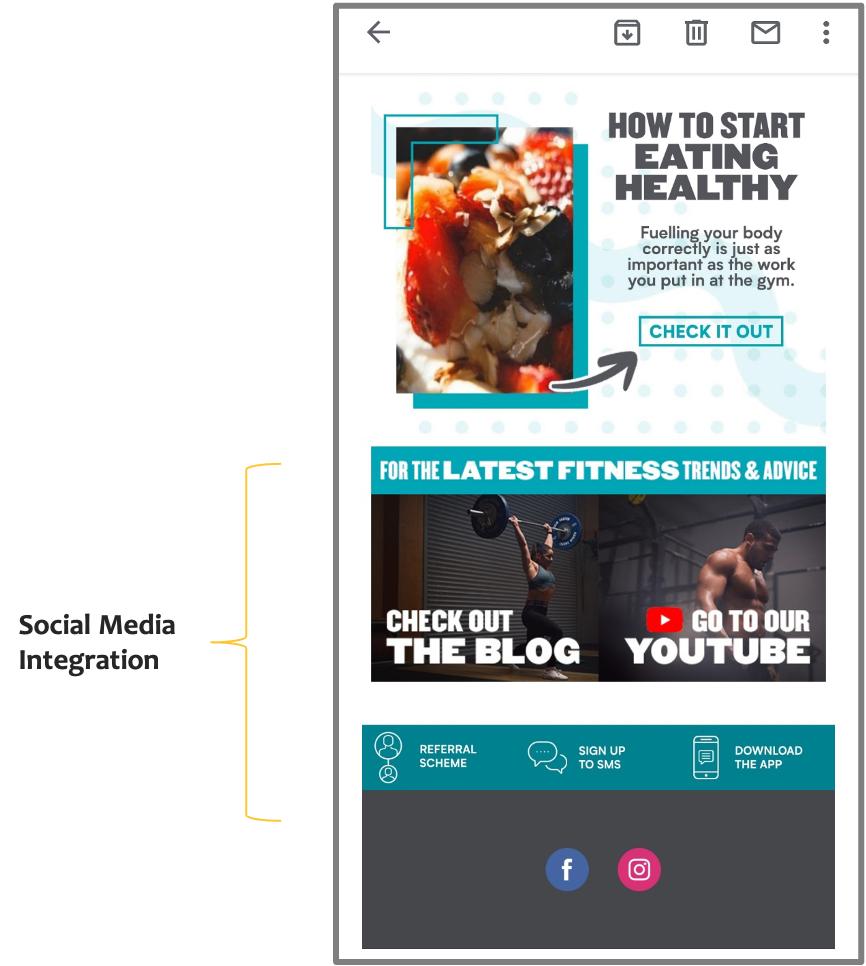
    Another content best practice you must stick to in 2021 is to ensure that your email design enables social media integration. Provide links to your company’s social media assets in the email. It is one of the easiest ways to integrate your social media marketing with your email campaigns. Even though it seems obvious, make it a standard practice to insert social icons on your unsubscribe page; “thanks for signing up” page; recurring email newsletters; auto-responders and official mail signatures.
    iii. Footer & Signature
    Your signature is not the place to express your sentiments on the environment nor your most favourite inspiring quote. Basic ground rules here include:

    – avoiding images in signatures – subscribers may have trouble adding images
    – sticking to text and maybe links
    – keeping them consistent with other signatures in the company, standard format, fields, and fonts. 

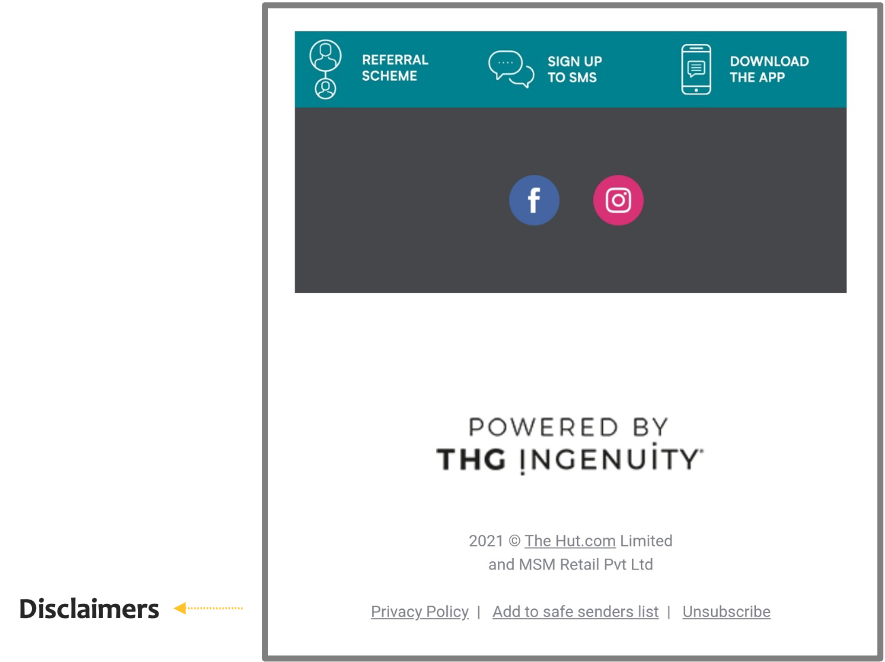
    In the footer, include your organization’s contact details, links to main segments of the website, key services or products, and social sharing or “forward to a friend” buttons. Another significant addition to the footer is a, “Why are you receiving this email?” and the unsubscribe button. This will reduce chances of your emails going to spam folders. 

    The introduction of block functionality by email clients like Gmail empowers subscribers to “block” a sender. Too many blocks can be detrimental to your sender reputation. 

    Principles of Design  and their application in emails

    Remember the third activity your reader’s brain is pacing to complete in 3 seconds? It’s trying to make sense of your email. Hence – keep it simple and quick to understand. Put your emails through a 3 second glance test.

    Once ready – show your email to a few people for 3-5 seconds and then ask them what the email is basically about. If their answer is vague and all over the place, you’ve got some decluttering to do.

    Adhering to basic design principles in your email will ensure you pass that glance test. The list below outlines the principles and best practices you can follow as you deploy them in your email.

    i. A clean and simple layout
    – Ideal email width is 500 to 650 pixels
    – Vertical layout is preferred over a horizontal one – use horizontal separators (visible or invisible) to create clean lines between sections
    – Design with white space
    – A navigation bar is good if you have multiple products or categories to display
    – It’s advisable to limit yourself to four or five sections for better visual emphasis – even if you’re offering retail solutions
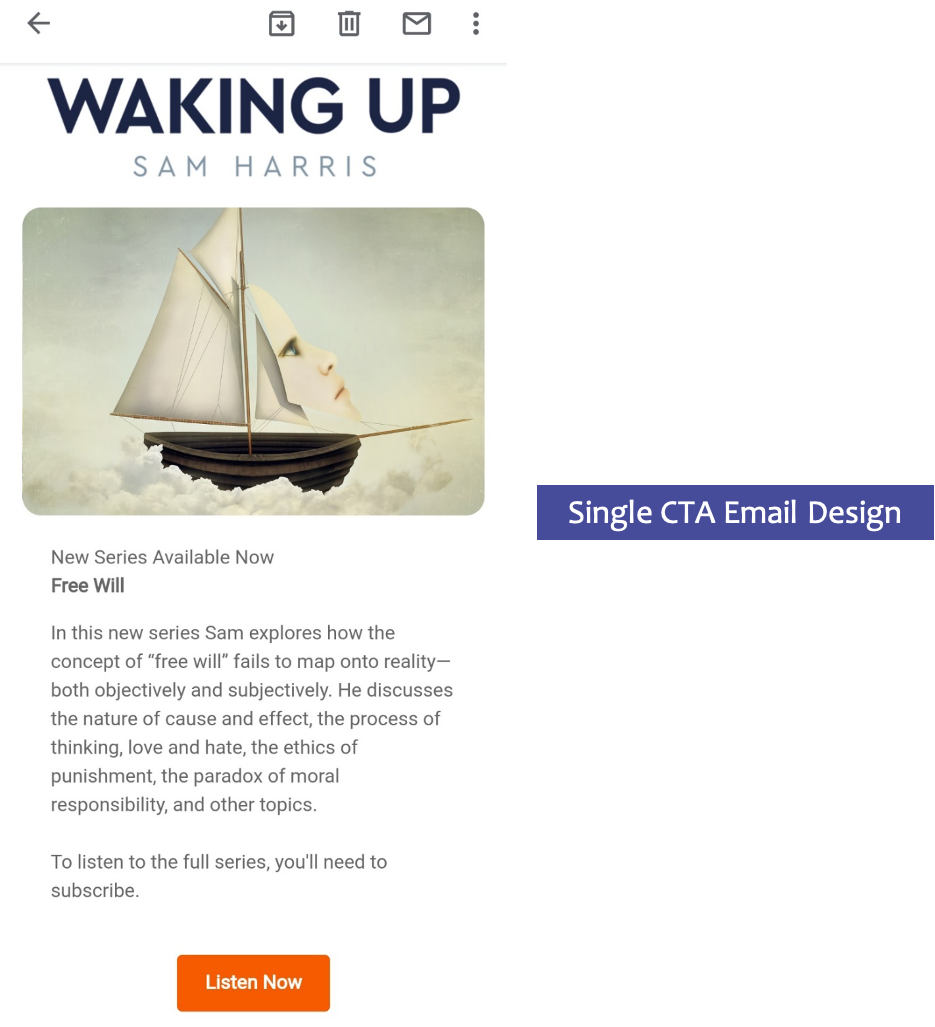
    – It’s a good idea to stick to a layout that draws focus on one thing ONLY and offers ONE call to action only. Your reader’s brain can’t really process more than that while reading your email and eating their sandwich.  Research backs our advice as emails with single CTA showed increase in clicks by 371%

    ii. Intuitive design
    Good design is intuitive.  This means it is grounded on natural human tendencies to view, understand and synthesize information. Tools of visual hierarchy use make comprehension easier. And every single aspect of design like placement, size, colour, contrast, fonts play a role in establishing visual hierarchy in your reader’s mind. More on this…

    – We naturally consider large, conspicuous items as more important. Hence, big fonts and larger images carry important information.

    – Natural eye movement is top to bottom and left to right – structure information such that important information is higher up on the page. Using patterns like zig zag (or Z) and inverted pyramid help mimic the eye movement in your email design. 
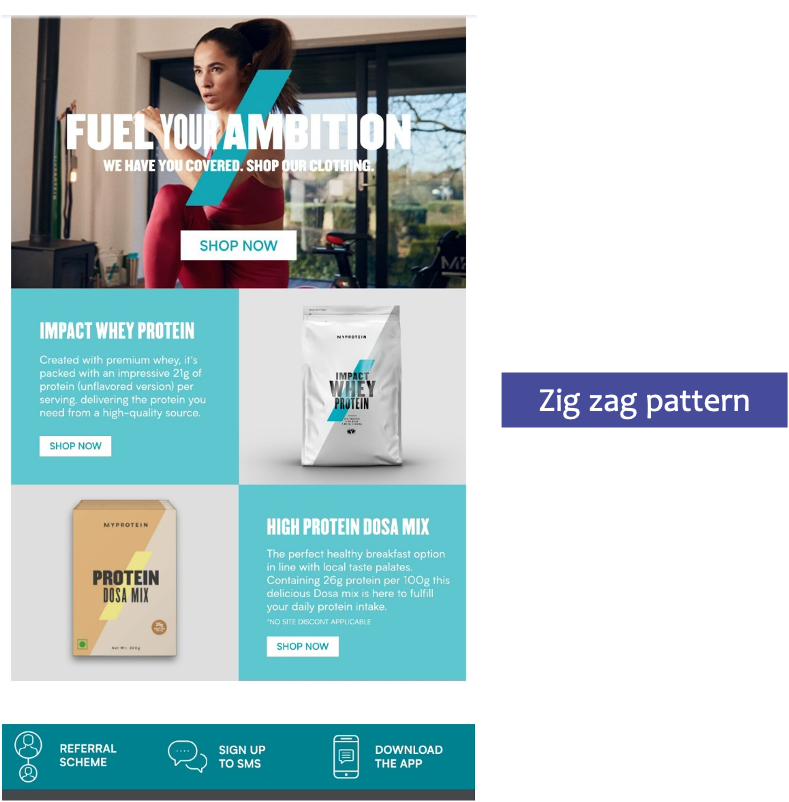
    – After navigating through your mail, your reader is naturally left with the question, “what can I do about this?”. Answer this promptly by ensuring your design guides the reader towards the CTA.

    – Use the CRAP principles of designing for better visual emphasis and to aid quick understanding

    iii. Facilitate brand recall
    – Use brand colours and fonts in every single campaign
    – Create a template – consistency in layouts and visuals communicates trust and reliability 
    – Don’t repeat every single part of the layout – that would communicate laziness; fuse creativity with your branding guidelines

    “Not enough talk about the importance of brand in email. Customers don’t sign up for email — they sign up for your brand.” — Bob Frady, CEO HazardHub

    iv. Effortlessly Readable Copy
    – Use short sentences and paragraphs
    – Use spacing and dividing lines to separate content sections
    – Add line breaks every 60 characters even in your plain text emails
    – Use bullets
    – Use web-safe fonts like Arial, Arial Black, Arial Narrow, Comic Sans, Courier New, Georgia, Impact, Tahoma, Times New Roman, and Verdana 
    – Safe font sizes are 14 pixels or more for body of the email and 22 pixels or more for title
    – Plan email content based on inverted pyramid

    Ensure your copy is succinct. Edit, re-edit, and some more. If you don’t edit, your reader will. Not your ideal CTA!

    v. Meaningful Graphics and Imagery
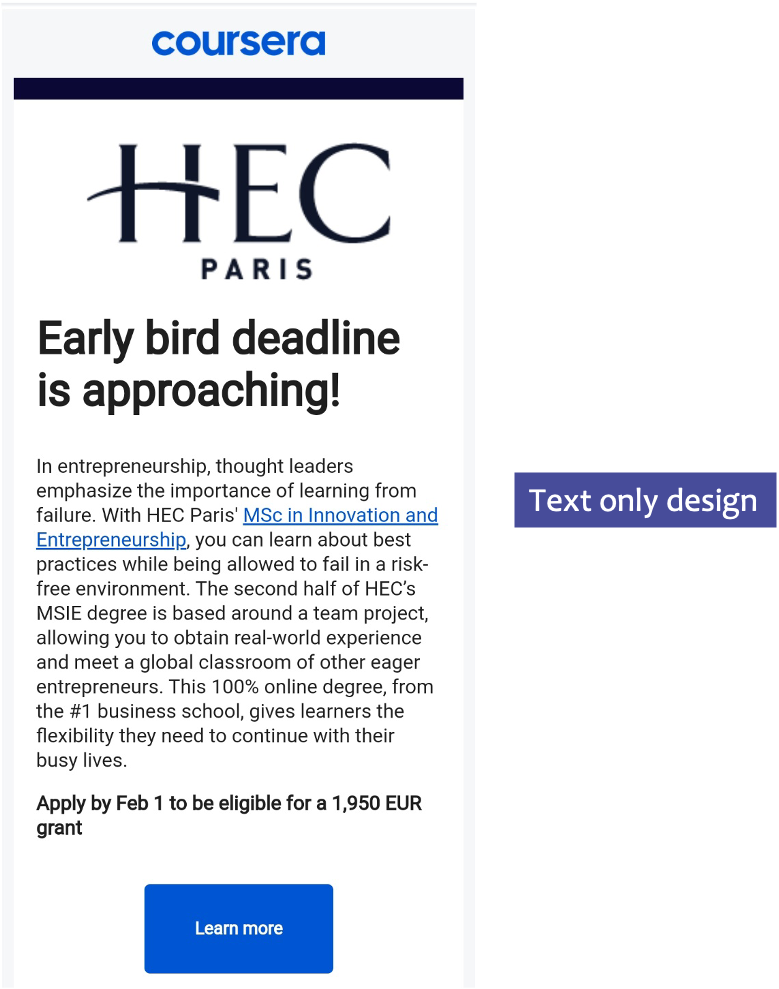
    – Experiment with text only emails or text-based graphics, in interest of simplicity
    – Use visuals like icons, infographics or short embedded videos
    – Provide fallback colour and alt-text for the image
    – Avoid background images layered behind text. Many email clients (such as Outlook) do not support background images
    – Do not squish or stretch images to resize images
    – For fluid emails, scale images up to 599 pixels
    – Make feature headers or product offers easily clickable in the email template 
    – GIFs are a good way to add an element of interest to your email

    Top 3 Email Design Must Haves in 2021

     i. Embrace hyper-personalization
    In a world where hyper-personalization is the order of the day, personalization in email is more than using your subscriber’s first name. Sometimes, it may mean displaying the credit balance or points earned to nudge them to shop more. And sometimes it may mean using AI, fetching data from other platforms to customize your campaign to the exact behaviours and patterns of your subscriber. Let’s say by setting up an abandoned cart series to snag that potential customer who’s probably forgotten to click ‘PAY’. 

    Naked Wine – online wine community and e-commerce store – relies on customer reviews to personalize wine tasting and buying experience. Customer rating on wines they’ve consumed or recommended; feedback and transaction data is combined to personalize email campaigns. Outcome – improved email engagement and campaign conversion rate by 40%. 

    The ability to send hyper-personalized, dynamic content based on user’s interests and behaviour is a trend that’s here to rule in 2021 and is likely going to around for a long time to come. 

    ii. Interaction = Engagement
    Luckily, email marketing makes directing interactive content to a consumer’s inbox rather simple and low cost. Basic skills at embedding HTML and CSS using an email editor is enough to get you started.

    Instead of sending a subscriber to your landing page right away, provide interactive content within the body of the email. This could mean including one or more of the following.

    – Built-in Surveys and questionnaires
    – Offers
    – Animated buttons and call-to-actions
    – Hamburger menus 
    – Product carousels
    – Rollover effects on products and offerings
    – User-generated interactive content
    – Accordion features
    – Add-to-cart 

    More interactive also enables you to integrate other channels into your digital marketing. For instance, if you share a video in an email, you might use social media share buttons to encourage others to share the video content on their own social media pages. The more integrated you can make your marketing campaigns, the more touchpoints you’ll create within your target market.

    iii. Leverage user-generated content (UGC)
    Adding UGC is a definite and proven trend that’s been adopted well and successfully in Email Marketing. Adding created by existing customers help show products/service in real settings and bump up brand credibility. Testimonials and reviews are a good place to start. You can also put together a small, fun contest around consumers sharing their images and videos. Place a small prize or a discount to encourage participation. Select the good quality ones, seek permission from your consumers, and voila! You’re ready to add it to your email. 

    In terms of design, it’ll help if you give your users some simple and clear guidelines to their content aligns with your design practices. For example: 

    – Share a photo or video drinking BeanThere coffee while working! 

    – Click a close-up photo or shoot a video of your hand the next time you’re wearing one of the TITAN RAGA watches.

    – Run-of-the-Mile Shoes and Hiking. It’s a match made in heaven! Click a photo with you wearing one of our collections on your favourite hiking trail and share it with us.


    In Conclusion
    You, me, and our competitors. The good ones and those we don’t consider a worthy match. There’s one question we’re all trying to answer. What’s that one trick in our digital marketing hat that will get our consumer to stay with our content a little longer?

    At CTC digital, we believe the answer lies in that harmony between good content and thoughtful design. This has enabled us to meet targets, build long-lasting relationships, and convert more people into paying customers and brand advocates. Start by giving design a serious thought and bring some of these easy to implement best practices in your emails. Pronto! 
  • A Step by Step Guide to Your First Killer Webinar

    A Step by Step Guide to Your First Killer Webinar

    Nailing it like pros

    In times when webinars are becoming a norm, it can be daunting for newbies to make their first webinar without the fear of eye rolls. Because obviously, there are good webinars and bad webinars. A good one takes your business closer to its objective and leaves your audience inspired. A bad one… well, it may just get you to witness The Great Migration of your audience to your competitor’s lands. 

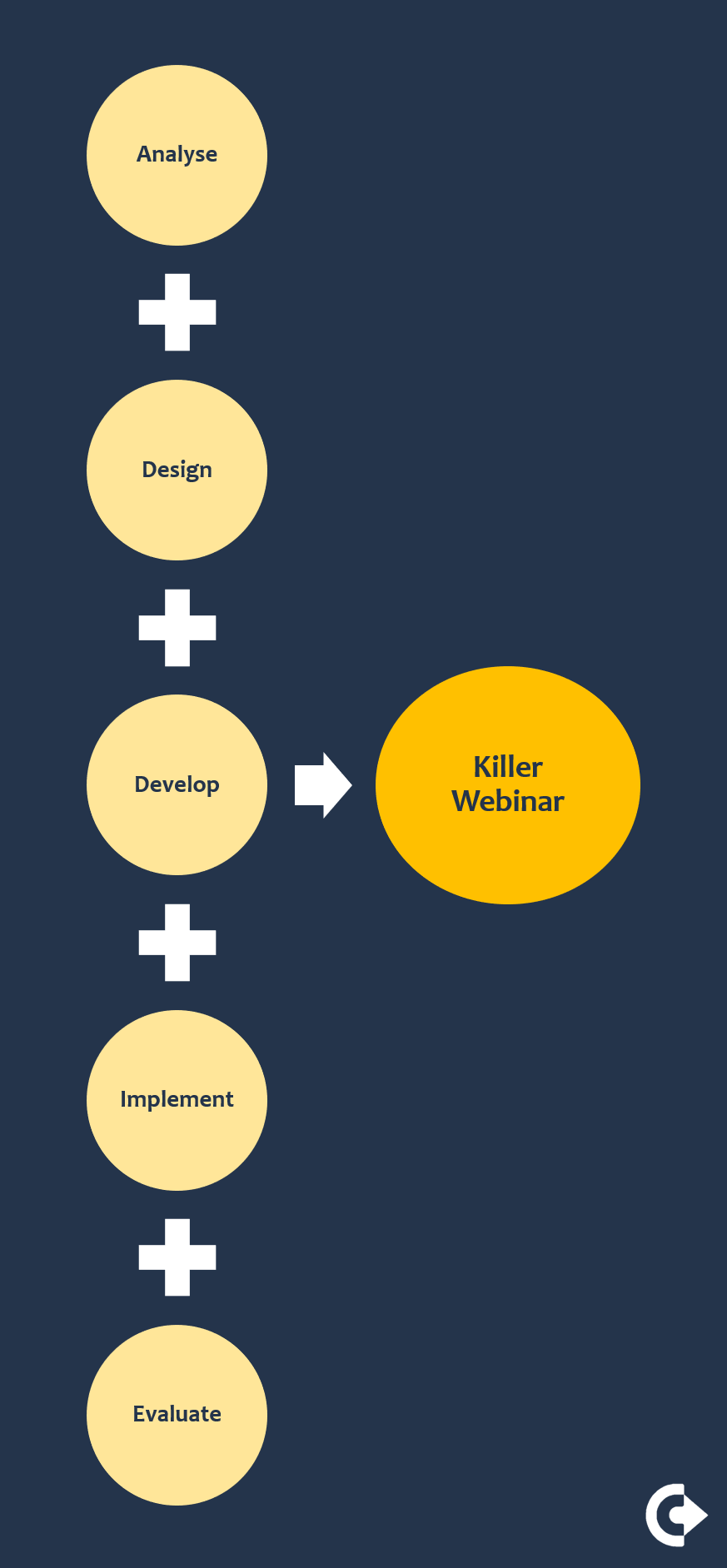
    In this blog, we go through a step by step process of creating a good webinar. The one that addresses real issues, bridges real gaps, and takes everybody involved closer to their unique goal post. To do so, we turn towards the super comprehensive and agile ADDIE process. (Don’t let the jargon scare you. Stay with me. The knots will untangle.)


    IN THIS BLOG

    1. ANALYSE the why
    2. DESIGN the what
    3. DEVELOP the content
    4. IMPLEMENT the webinar
    5. EVALUATE results

    Step 1 – ANALYSE the why
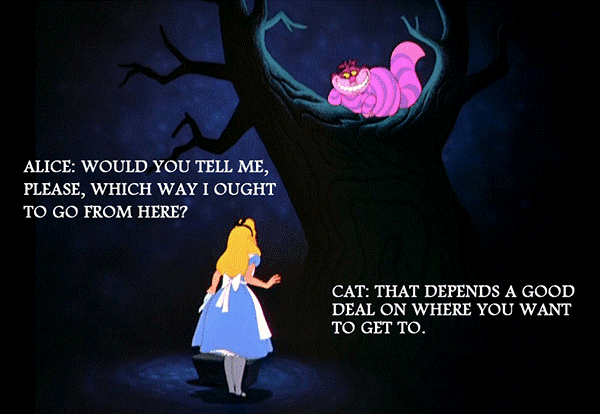
    From Cheshire Cat to Simon Sinek – everybody is trying to get us to clarify our big WHY – the raison d’etre of our actions. 


    Your decision to host a webinar is no different. Knowing why you want to host a webinar, why you should invest your time and money on one will help you craft an impactful one. It’ll also go a long way in ensuring that your spirits stay up when you hit roadblocks. Yes, you will hit roadblocks. A few. 

    So, really put that pen to paper and find your answers to these questions. 

    1. What is the Business Objective you want your webinar to impact? Sales, lead generation, customer connect? A clear objective will help scope the webinar, keep you from trying to achieve too much, or tell too much – a pitfall not easy to avoid for subject matter experts.

    Knowing what you want to achieve will guide you to take a calculated decision of how much investment to make. And at the end, how to measure the returns on it.

    2. What are the goals your audience would like to achieve through your webinar/s?

    – Who is your target audience? Know their buyer persona – their motivators + fears.

    – What would give them a distinct feeling of having gained from your webinar? A new skill, a paradigm shift, or a useful freebee? 

    – Think about what real life challenges your webinar can solve for them. Let that be your motif.

      Step 2 – DESIGN the what
      Now is when you scope and plan your Project Webinar. This is the stage which decides whether your final product looks like it is out of a Michelin star kitchen or is a desperate attempt to salvage your reputation in front of your girlfriend. 


      Each of the points below are things you plan right at the outset to reduce your oops moments and reduce the avoidable last minute (& expensive) fixes. 

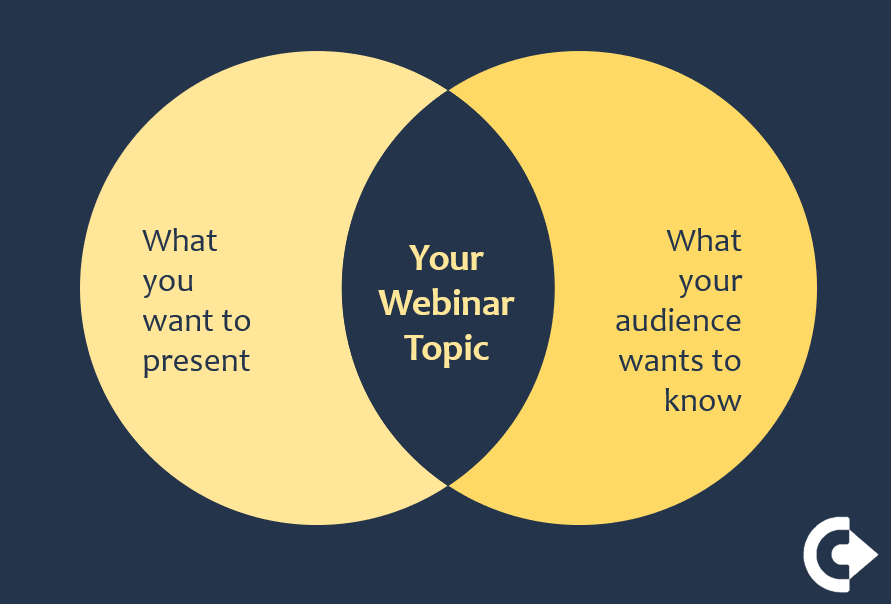
      1. Choose webinar topic/s that hit that sweet spot of what you and what your audience would want from investing time and effort in this webinar.


      2. Choose the right frequency to host the webinar/s. The 2019 High Growth Study by Hinge Marketing reports that of firms deploying webinars, 68% host multiple times per year, 25% monthly and 7% weekly.

      3. Identify the best format. Remember function dictates form. The goal you wish to achieve should govern the choice of format. Choose from

      – Single presenter

      – Panel discussion

      – Interview with an industry expert

      – Q&A format – driven by audience interaction

      If choosing to host webinars frequently, consider changing your format now and then. Create monthly themes to help your audience see the method in the madness.

      4. What’s the number of registrations, therefore attendance, ideal for your webinar format and goals? In our experience, average attendance rate is 44% and anywhere from 40 t0 50 attendees is good, especially considering engagement and interactions. 

      5. Plan your promotions. Do you have an in-house digital marketing team or will you engage with a firm? What’s going to be your marketing spend, how many days in advance should you start the promotions? At least a fortnight before is strongly recommended.

      Include a short questionnaire – with well thought-out questions – in your registration form. That information will prove to be a goldmine for your content and
      script.

      6. What’s the best duration for each webinar? What’s the best time slot and day to host your webinar? 45 to 60 minutes is a good window to play around with in the beginning. Mind the time zones of your target audience when creating the schedule. 

      7. What are you offering to your attendees? A discount, an access to a special club, free trial, free version, money back guarantee, free evaluation/consultation? What is the time limit that this offer will stand for?

      8. What will be the call to action for your audience? A click on the BUY button, a registration form; a call or meeting with your sales team? A clear call to action is really the difference between an impressive webinar and an impactful one.

      9. Choose your webinar platform. They can cost anywhere from a peanut to an arm and offer just as wide a set of features. The features you need today and will need in the very near future should influence your choice. 

      Ensure the platform supports mobile devices. Over 25% of your attendees will be joining from phone.

      10. Standardize brand guidelines. Colours, fonts, background, logo placement, brand introduction etc. As the line between office and working nooks at home blurs, these become hugely important. 

      If designing the background at home, keep your back towards the wall & face the room. That way, you only need to stage manage the wall instead of an entire room. Keep your light source and camera up and in front to paint a flattering little picture of yourself.

      11. Create essential roles for Project Webinar. You don’t need a buzzing team at your disposal. Find just one additional human to share these responsibilities with.
       
       Marketing & promotion – responsible for launching promotions on time or to liaise with your digital marketing team to get this done

       Audience engagement – before and after the webinar

       Back end support – responsible to launch polls, respond to chats, liaise with live audience; especially needed during the webinar if your format is Q&A or panel discussion

      – Content developer – for your webinar presentation plus promotions and after event engagement will need dedicated time and focus from you or another expert 

      Host/s or Speaker/s – may be the same person or different people

      Sharing the load of presenting your webinar with a co-host creates scope for conversation, banter, and fun. All in all, two engaging hosts are better than one engaging host.

      Step 3 – DEVELOP the content
      In spite of all the professionalism you will exude after nailing items in DESIGN phase, your audience is not likely to come back if the content of that 1-hour webinar has them OD-ing on caffeine – or thoughts of caffeine. Be sure to put in your most creative, your most strategic head here. 

      1. Give your webinar title a thought. It drives your registrations after all. 

      “… for new businesses”; “Quality Tools for modern shop floors” – titles referring to profession, goals, interest, hobbies of your target group have proven to be effective to hook attention.

      2. Structure the content. Like a Table of Content or Index. It will help you build a smooth and logical flow, and allow your audience to navigate better as you speak.

      3. Use this structure to design a compelling landing page for your registrations.

      4. Go through your registration responses. Note their workplaces, cities, interests, problems they want to solve. Weave them into your content. And into your script. Address them before the Q&A section.

      5. You don’t want to sound like a cloyingly polite sales rep with a hidden agenda. So, keep your main points, the tips & tools you’re teaching absolutely distinct from the selling pitch. Handle that as a separate “call for action” section after.

      6. Ensure your slide deck is clean and contemporary. It conveys your ideas well and is predominantly visual. Document design for marketing and sales is a skill. If that’s not your area of expertise, you’re better off engaging with an expert.

      A quick search on “Presentation Templates” will give you bazillion choices of free or paid versions. Some with rather neat designs you can customize to your brand
      guidelines.

      Step 4 – IMPLEMENT the Webinar
      Now, is the time when you serve the dish you’ve so laboriously created in your little Michelin Star kitchen. 

      Before the D-day, ensure that you:

      – Practice. A lot of webinar platforms allow you to launch a practice instance. Utilize that to nail your script. Do this especially thoroughly if the webinar has more than 1 speaker

      – Practice launching of polls, typing in timely responses to the chats etc with your backend support buddy

      – Check visuals, lighting, background, audio, internet speed

      Aim for internet upload speed of over 5Mbps to host a smooth webinar. You can test your upload speed at SpeedTest.net.

      On the D-day, ensure:

      – You and your team launch the webinar at least 30 minutes in advance

      – You get the fundamentals right – start and end on time; look professional and relatable; smile; mind your Ps and Qs

      Once the event is over, send a Thank You note within 24 hours. In this, consider including:

      – Highlights of the webinar 

      – Short (not more 3 questions preferably) feedback questionnaire

      – Questions to seek opinions on what they’d want to know more about, and what would encourage them to be a part of the next one

      Step 5 – EVALUATE Results
      The feedback forms – if your audience does respond, will give you food for thought. And if you’re lucky, a clear direction towards your “what next?”. But effective measurement of ROI is a different league. And, nope, it’s not for the weak hearted. Especially if your webinar is about customer-education. Or product-demos near the bottom of the funnel but not quite the last touch in your buyer’s journey. Even when sales is the ultimate goal, there are several ways to handle webinar ROI.

      Number of registrants – use this metric monitor growth of your webinar audience and topics that attract the most attendees

      Attendance rate – how many registrants actually attend the webinar

      Engagement/interest rate – hidden behind proprietary algorithms of webinar software, it’s an indicator of how engaged your audience is. A high engagement rate could potentially mean high leads

      Number of generated leads – knowing how many leads can be attributed to the webinar (or any marketing channel) is powerful – a good CRM can help you that; for small to medium businesses – a quick post sales survey can help too

      Revenue per lead – understanding value of a lead helps measure ROI of that channel. If a lead is worth $500, the webinar production cost is $250, and it generates two leads – you have a return of $750 for your investment in the webinar.

      Decide which metric is most relevant for you at the beginning – during the ANALYZE stage and make it known to your team. This ensures everybody puts in concentrated efforts towards a common goal.

      In conclusion
      The ability to craft a great webinar and take it to the right audience can be life-changing – for you and your business. Nail the planning and give yourself a 30-day period to launch your first one. Download this checklist + scheduler + ROI calculator designed by the marketing nerds at CTC to help you stay you on track.

      • How Webinars Can Help in Times of Uncertainty?

        How Webinars Can Help in Times of Uncertainty?

        Utilizing webinars in a VUCA world

        The world we live in today is an uncertain, fickle-headed place. It’s the truth we’re all finding ways to come to terms with as the Corona story unfolds. And while the Corona issue is an obvious contributor, there are several other factors that make our world today rather VUCA (Volatile, Uncertain, Complex, Ambiguous).  To name a few – the diminishing line between business and political leaders, the maddening pace of technological changes, increasing need to access global talent, or the need for all things “instant” by customers & employees. 

        So, what do these uncertain times demand of modern-day businesses? How do businesses stay profitable in such an environment? By ensuring that their communication channels with employees, investors, and customers stay open – at all times and in spite of odds. 

        Enter Webinars. As a medium to establish real-time, face-to-face contact with stakeholders spread across the world; to utilize creative ways to build brands, generate leads, even sell. As a medium to build deep, meaningful relations. 

        Admittedly, the webinar is first a marketing tool. And a great one at that. While there are many marketing tools that could be used at a time like this (like pay per click or email marketing), webinars come in as the #1 choice because they allow you to demonstrate your product, service or idea to a live audience. The trick is, of course, to be able to do it right.

        Read below to see what a webinar done well means, how that can be the instant answer to mitigating business uncertainties and branching away from a single business model.

        Before we dive in, here is a quick statistic by ON24

        – 89% hosts agreed that the webinar is their platform of choice to showcase and grow their business

        – 95% respondents agreed on webinars as a key to their lead generation and marketing efforts

        – 75% reported that they use webinars to build their brand

        – 76% achieved more leads by running webinars

        – 69% respondents scaled up their market through webinars

        IN THIS BLOG

        1. Why do businesses need to adopt webinars today?
        2. Types of webinars
        3. Top 8 business goals you can achieve through a great webinar (with real life stories and best practices)
            i. Lead Generation
            ii. Sales
            iii. Branding
            iv. Creating value
            v. Events
            vi. Training
            vii. Education
            viii. Product Demo
        4. In Conclusion

        Why do businesses need to adopt webinars today?

        Here are a few ways in which webinars impact the 3 big levers of your business.


        Types of webinars
        Classified simply on the basis of how you host a webinar, there are 2 variations.

        Live
        A live webinar is an online meeting or a presentation held in real time. The presenter or the host connects with numerous attendees from different locations. It’s big plus lies in giving its attendees the ability to interact, exchange body language cues, and therefore afford a real conversation.

        On Demand
        This is a recorded webinar used for viewing “on-demand” by new attendees whenever they want to. The big plus here is that the viewer can attend it at his/her convenience.


        Top 8 business goals you can achieve through a great webinar

        Lead Generation
        A lead generation webinar is one of the most common types of webinars offered today. This webinar is chock-full of expert advice and attempts to solve a real problem for its viewers. It is important to understand that when you offer this type of a webinar, your advice should stand independent of your product or service, making it a largely non-selling webinar.

        To achieve this, bridge the gap between knowledge and information. Do share knowledge about the industry, about best practices etc but not explicit and detailed information about your product. If the knowledge you share is relevant and presented well, it will establish your credibility with your prospects. That means they will come back for more.

        When you share valuable knowledge through your content, not only do you get a new lead and a chance to sell, but you establish your brand much before the customer has consumed your product or service.

        Content that establishes your expertise + Content that solves real problems + Content presented well
        =
        An effective lead generation webinar

        In a lead gen webinar, providing valuable content directly contributes to your ability to collect valuable information from your customers

        Take the example of Hubspot –  an online marketing, sales and service software.  Their website has a section dedicated to valuable on-demand webinars that solve business problems their current or potential customers may face. This gated content library is used to secure leads on an ongoing basis. Here is what their webinar library currently looks like.

        At the same time, ensure you utilize your live as well as on-demand webinars to generate leads.

        A study by Gotowebinar suggests that 73% of professionals prefer on demand videos over live videos. As long as you are delivering enough value via your content, you will keep increasing the lead flow into your business.

        Here are some best practices to design a Lead Generation webinar that give an adrenalin boost to your marketing efforts.

        Do’s:

        – Choose a topic that your target audience identifies with

        – Focus on adding value and building credibility. Your goal, at this stage, is to ensure that you become the preferred point of contact for anyone seeking a solution within your industry

        – Invite an industry expert as a guest speaker – it helps establish credibility

        – Invite a guest speaker who is an expert – it adds credibility

        – Use interactive tools. Involve your audience, allow them to ask and share opinions. Keep a slot for Q& A in live webinar and an option to fire-off questions via forms/emails in on-demand ones

        – Respond. Always and on the promised turn around time

        – Send follow up emails/newsletters with more valuable content on an ongoing basis

        – Finally, attach contact forms. That’s a great way to narrow down leads. Ask relevant questions but don’t make it too long. We’re yet to meet anybody who loves filling long forms!

        Don’ts:

        – Target audience without looking at their specific interests and problems

        – Drone on about yourself and your company in the very beginning of the webinar (at least not for very long)

        – Focus on selling in the start or the middle of the webinar. If you must, throw it in towards the end

        Sales
        A sales webinar’s primary objective is to sell. And most experts will agree that you can sell anything on a webinar. In a study, ON24 analyzed the conversion rates for webinars with a minimum of 100 attendees. The study concluded that:

        – Webinars related to communication got 67.05% conversions

        – Training webinars got 44.79% conversions

        – Marketing webinars achieved 39.10%

        – And education webinars got 30.79%

        With our experience in helping businesses market online, we can honestly say that it is never easy making a sale when the potential customer first comes in contact with your service or product. There needs to be enough trust in the mind of your potential customer to buy from you. And that building of trust doesn’t happen overnight. It’s got to be built. So, the only way a webinar with sales as its objective succeeds is when the host strives to build a strong connection with attendees. On a human and emotional level.

        There are some businesses that have a proven track record of sales success on webinars.

        Our research confirms that knowledge-based services or products that allow users to continue learning in the medium that’s similar to the webinar itself are ideal for selling.

        An example is a webinar that sells online coaching to students. The webinar talks about the coach’s credentials, coaching methodology and fees. The user then goes to the page, fills up the subscription form and starts attending the online coaching class. It is a seamless process.

        Lewis Howes went from being broke to earning $6300 per hour from his first webinar series! Today, he is a lifestyle entrepreneur, high performance business coach and keynote speaker. And it all started with a book he wrote and an invitation to be a guest speaker on his friend’s webinar. The story of how Lewis structured that webinar is very interesting too. He had a 1-hour slot in which to speak about LinkedIn in this free promotional webinar. He offered very valuable advice for the better part of the webinar and then threw in a free LinkedIn training for 50 minutes towards the end. And just before ending the webinar, he opened up 10 exclusive spots for advanced LinkedIn training for a completely customised approach at a 50% discount for a limited number of hours. He walked away with $6300 in his Paypal account.

        So, what is that you can really sell well over a webinar?

        – Digital products

        – Real products

        – Services

        – Workshops and seminars

        – Online & offline memberships

        – Private & group coaching

        Branding
        Some of the best webinars out there today are hosted by people who have established their authority in their field of work. People attend seminars, courses and undergo coaching when they are interested in a particular subject and want to learn from an expert. Similarly, hosting a webinar on specialised topics positions you as an expert, increases your credibility and ultimately helps you create your own brand.

        The question that could be asked is, does one really need to be an established name or brand to host a webinar and expect people to attend? The answer to that is a big NO. 

        Webinars offer a perfect platform for you to build your own brand from scratch. You don’t need a finished product, a mailing list or even a social following, you can literally build your business with webinars. If you can establish authority in your area of expertise by offering solutions to problems that a majority of your target audience might be facing, you can set up your business using only webinars and scale from there.

        If you are interested in increasing your brand value, get in your industry experts and have them share content designed exclusively for your webinars. This is a great way to co-market as well as introduce yourself to new audiences!

        These best practices will make sure your brand building webinar gives you the perfect bang for your buck.

        – Ensure your topics are really well researched and tie in with whatever is most current. Take cues from topics covered by SEMrush

        – When choosing the industry experts, examine their existing social branding. It is important, if not mandatory, that your expert have a decent following online

        – Brand all material and content you share before and after

        – Market your webinars well in advance; 7-10 days prior to the event is ideal

        – Record and create an on-demand library and make them available on your website

        Creating value
        Until now we’ve seen how webinars can be an effective marketing tool at the top of your marketing funnel. However, webinars can also be used to create value for your existing customers. Value creating webinars are a bit different from lead generation or sales webinars in the sense that they do not necessarily “always” talk about your product or service. The idea here is to provide value to your existing customers by focusing on relieving audience’s pain or enhancing quality instead of self-promotion. These webinars offer such good value content that consumers can’t help but share through word of mouth or social media shares and likes.

        Trello has a great on-demand webinar hub. Even a cursory glance will tell you that this hub isn’t all about what Trello does. They’ve thrown in a great mix of webinars which aim at general business and productivity content. All these webinars create value for their existing user base and are a great way for Trello to also collect valuable potential customer data.

        If you have a business, you’re certainly in a place that impacts an aspect of your consumer’s lives. Pull out your expertise, connect with your industry experts, and craft webinars that improve your customer’s lives.

        Events
        A “webinar-based” or “virtual” event is where you hold conferences, meeting, trade shows over the webinar. These can be of 2 kinds – (i) a “pure bred” webinar event where you’re only engaging with audiences virtually; (ii) a “cross” or a hybrid event where you engage with a live “in-person” audience as well as with a virtual one simultaneously. In either case, a well-planned, successful webinar-based event ensures you reach a wider audience, improve event ROI, and get access to valuable data points you may not get otherwise.

        In the year 2020, choosing to host a web-based event also means you do not have to cancel or push your event to another year or to a different planet. 

        Yellow co., amongst many others, has converted its annual Yellow Conference into a virtual format. 

        There are several creative ways in which you can host a web-based event. Take your cue from Apple Special Events with Tim Cook announcing the launch of the next Apple gadget to his live & virtual audience. Or, Social Media Examiner, which sells virtual tickets to its annual Social Media Marketing World conference – the biggest live event in the social media world. The virtual attendees get access to the recorded conference as well as to a private networking group to meet and communicate with peers. Organizations like Moz and Content Marketing World record their annual conferences to curate a compelling on-demand library. These are then made available post the event free of cost or at a price. 

        If a large event involving your internal and/or external stakeholders is what you had in mind for 2020, we suggest you don’t let the Corona monster derail your plans. Choose a webinar-based path and start planning now. Do ensure:

        – hosting virtual events requires the same care & attention as hosting physical events

        – to not drop the ball on your planning and preparation during the complete event cycle

        – to bring strong facilitation – virtual emceeing is done at a slower pace than face to face emceeing

        Cycle of a successful event


        Training
        You have most undoubtedly witnessed the webinar in its avatar as a learning tool in last few weeks of the world dealing with the COVID19 menace. 

        A business objective that the webinar is perfectly tailor-made to achieve is that of training far-flung, dispersed learners. From employees to customers, from niche or complex application trainings, to the fuzzy & nebulous ones on behaviour and performance. The webinar offers a great solution. 

        A 2019 study funded by the Federal Ministry of Education and Research, Germany attempted to understand how webinars performed in comparison to online and face-to-face instruction in promoting learning and satisfaction. The study concluded that with regard to learning effects, webinars appeared to be equal to face-to-face learning. This was attributed to its built-in capability to promote interaction.

        What’s more? Converting your training sessions into webinars does not require you to reinvent the wheel. You can utilize your existing presentations, handouts, and other collaterals. Just keep in mind different learning styles while synthesizing the content into 50-60 minutes cohesive chunks. 

        Very early on in this journey with webinar trainings, you will appreciate how you’re able to expand your reach, augment e-learning – if any, and build engagement. All this while saving time and cost! 

        Multinational software organization Citrix Systems, Inc. until recently spent over $600,000 per year to conduct in-person trainings for its new employees in every new region it expanded to. The last 2 years, however, have seen Citrix build the same level of engaged and immersive learning experience through webinars. In Citrix’s experience, training webinars have substantially lowered the barriers to global expansion & up-skilling of employees. 

        You can use it too to offer an immersive & sticky learning experience to your learners. Just remember to:

        – Leverage interaction tools like text-chat, poll, hand-raise, voting, drawing in every session

        – Put together compelling content – focused, driven by learner needs, and diverse. Weave in e-learning courses, videos, audios, images, presentations, tests, multiple presenters etc.

        – Follow up with feedback questionnaires and assessments to keep the engagement alive 

        Education
        Webinars allow schools and colleges to offer a blended learning model of pedagogy. They get to host their lectures live and on demand to students spread across. And students get to complete their degrees and diplomas from anywhere, yet gain from the rich experience of being guided by a teacher. 

        Webinars have come in most handy today as the education industry grapples with curriculums in a locked-down world. Nearly every education institute – from kindergartens to universities – is utilizing them to reach out to its students in the safety of their homes.

        According to a study by the U.S. Department of Education, “on average, students in online learning conditions performed modestly better than those receiving face-to-face
        instruction.”

        Recent years have also seen the education industry evolve to leverage the webinar as a tool to engage with its prospective students. Forums such as open days online, virtual campus tours, online meetings, online recruitment guide help universities give their prospective students a first-hand understanding of the life in store for them. 

        Universities like the Durham University Business School (DUBS) replicate the grandeur of their physical open days in their Virtual Open Day. In a webinar branded in DUBS signature style, students move across 16 individual sessions on a variety of topics to learn from a faculty and interact with them. Outcome – the university exceeded its registration target by 36% and over 60% of registrants stayed engaged with the event throughout (industry average). 

        If expanding your reach as an education institute is your objective, it’s time you adopt webinars. Remember:

        – When offering a blended model of pedagogy, supporting your learning community with a variety of tools is essential. These may include – email support, video/audio meetings in one-on-one or small group format

        – Build student interaction by means of collaborative tasks that get them to engage with each other

        – Follow up and share learning resources – handouts, lecture recordings, assessment

        Product Demo
        A product demonstration using webinar tools including screenshare, application sharing, integrated videos clips, or simply an on-camera demonstration comprises nearly 39% of all webinars hosted on Click Meeting. A deminar, as its often called, enables you to demonstrate your product or service while having a real-time conversation with your prospects. 

        Let’s take for example the SaaS industry. Most of the applications and platforms these organizations sell are complex and comprise plenty of features seeking clear explanation. So, while video based product demos win hands down in comparison to traditional product literature, Webinars offer an additional advantage of interaction. 

        71 percent of people buy because they like, trust and respect the salesperson they have engaged with. Live product demo webinars, augmented with features like chat, hand-raisers, online poll help you build conversations and relationships.

        Actuate, an embedded analytic software company, acquired by Open Text, started leveraging branded live and on-demand webinars to reach out to its customers. The increased frequency of live demos and quality archived content had a pretty dramatic effect on the results within the first quarter. The organization saw a 25% increase in new contacts from the bi-weekly product demos, a 65% registration to attendee rate for the demos.  Almost 90% of webinar attendees stayed for the entire event.

        Product demo webinars, used as bottom-of-the-funnel webinars are built to give your prospects the information and comfort they need to make that final purchase decision. To craft a powerful one, remember to:

        – Craft your script intelligently and passionately. Webinars work because they allow your customers to see that

        – Highlight your brand, product USP, share testimonials – explicitly

        – Leverages webinar tools like screen sharing, application sharing, and video recordings to keep it engaging

        In conclusion
        From learning yoga to shortlisting the next kitchen gadget, a lot is happening over webinars. This ubiquitous, simple tool has stepped up and come to our rescue to help us inform, connect, and engage with fellow humans in 2020. As a result, the rise of webinars as a business tool of the year has been unmistakable. ON24 reports a 66% jump from the number of webinars hosted in Mar 2019 to Mar2020. There’s a high chance you have either already attended or are planning to attend at least one during the current month.

        So, if you’re not using webinars already to meet your business goal, now is the time. If you are using it, widen your options and bring a variety of tools and features into your webinars. Explore other ways to truly harness its potential. Do check our step-by-step guide to designing a perfect webinar for a deep dive by our experts into what works and what doesn’t.