So, you’ve got your Facebook business page up; you’ve got some likes (mainly cause you asked people); few page visits and few impressions on photos and videos. Maybe you even spent a few dollars on a Facebook ad but you are just not getting enough traction and click throughs. Facebook success stories aren’t helping either.
It’s time to direct your energies on optimising your Facebook page. Because therein lies a well of business opportunities. Despite controversies with data privacy policies, Facebook has shown an increase of 13% in its daily and monthly users compared to the previous year. It is, undoubtedly, still the world’s largest social media juggernaut.
And that’s why, it is a vital cog of your marketing strategy – a perfect platform to showcase your value-add, respond to customer queries, generate leads and increase sales.
IN THIS BLOG
1. Facebook Marketing Basics
2. 13 Hacks – Quick and Dirty on getting your FB page to do the work for you
i. Ensure your NAP is absolutely accurate
ii. Choose the most appropriate template
iii. Connect WhatsApp to your Facebook page
iv. Use a persuasive Call-to-Action button
v. SEO Essential: Long Tail Keywords
ⅵ. Backlink your Facebook page from your other digital assets
ⅶ. Reviews make a difference
ⅷ. Add visual imagery and more of it
ⅸ. Facebook Live
ⅹ. Different time zones need a scheduler
ⅺ. Show value first
xii. Optimise your Facebook page settings
xiii. Optimise Facebook Messenger
3. In Conclusion
Facebook Marketing Basics
– Your Facebook page is not your website, especially for B2B businesses. It is best not to substitute it for your website either. This platform is mainly used to expand reach, tell a story and announce fantastic offers and deals. Your website is a whole lot more comprehensive.
– Consider your Facebook Page as a micro-site within Facebook’s multiverse of millions of pages. Essentially, your page provides highlights of your products or services and your brand.
– Search Engine Result Pages (SERPs) often feature social media accounts in top rankings. A well-manicured Facebook page and presence on other social media platforms can certainly boost the chances of more people finding your brand on search engines such as Google.
– Consider fine tuning your search engine optimisation process when you post on Facebook. Important keywords related to your brand should be well distributed in your Facebook page and your posts.
– Facebook offers a bundle of features that help optimise Facebook business page. For instance, Location Pages, Messenger, Boost, cross linkages to Instagram, and WhatsApp. Optimizing these to improve your design, layout, and functionality can help you turn your Facebook page into a high-converting business tool. In the following sections of the blog, we will guide you on how to use them – quickly and effectively.
13 Hacks
1. Ensure that your NAP is absolutely accurate
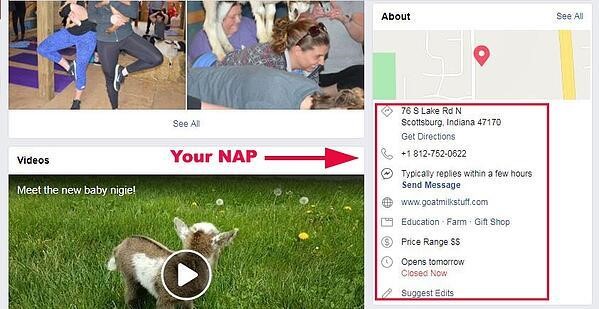
NAP is Morse code for Name, Address and Phone Number. You have perhaps already listed your business on several online yellow pages and submitted your NAP. It’s not any different on Facebook. However, you have to ensure that all the details in your listings, including Facebook, must be absolutely consistent. Else, online search results for a particular product or service may not include your business within the top rankings.
Check and double check that all spellings, numbers, and abbreviations are the same through all your listings.
2. Choose the most appropriate template
When you first set up for your Facebook business page, you are presented with several options to choose the most appropriate template for your business. These include:
– Standard page
– Business
– Venues
– Movies
– Charity
– Politicians
– Services
– Restaurants and cafes
– Shopping (This template embeds the “Shop” button on your Facebook page)
– Video page
These templates have been found to be most functional for all 10 business types listed above.
When you choose a template, you will notice that there are already pre-positioned tabs and buttons. These can be edited and customized as much as you want till you are satisfied with the appearance and efficiency of your page.
3. Connect WhatsApp to your Facebook page
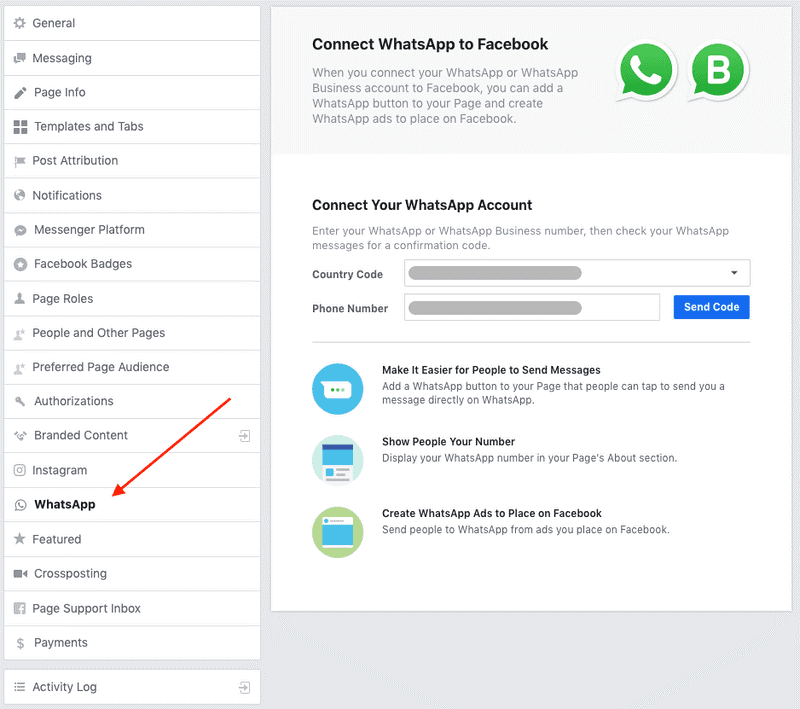
Facebook now allows you to integrate your WhatsApp business account to your Facebook page. This is good because WhatsApp is most commonly accessed by people, it is a quick, convenient and effective way of managing your brand’s community and staying in touch with customers. Adding the Whats App button to your Facebook page can add to the ease of access and help customers immediately contact you. This can prove to be very strategic to your lead generation efforts.
It’s a good idea to add the WhatsApp button to your Facebook ads as your call-to-action.
4. Use a persuasive Call-to-Action button
All the jazzy images, high quality videos and attractive content will not yield substantial results, UNLESS you let your customers know what to do next. That’s why the need for a clear Call-to-Action (CTA) button. So that your visitors know exactly which action to perform in order to avail of your offers and services. And the good news is that you can have a CTA button built into your Facebook page or ad.
Typically, the CTA button on your Facebook page will be located below your cover art and on the right side. You can choose from Facebook’s extensive range of CTA buttons – in fact from 20 different options.
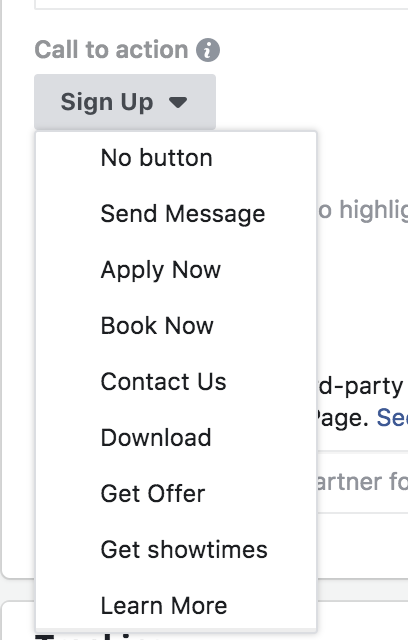
The top most commonly used CTA buttons include the following.
1. “Send Message”
2. “Apply Now”
3. “Download”
4. “Learn More”
5. “Contact Us”
The buttons you use must be obviously and directly aligned to your business goals.
CTA buttons to build and expand awareness: At this point, customers don’t know your brand. Through your Facebook ad, you wish to establish your presence and increase familiarity with your brand. Good CTA choices…
– “Download”
– “Learn More”
– “Apply Now”
CTA buttons to encourage your customers to consider your brand: Through your Facebook ad, you now seek to engage with audience that is most likely aware about your brand. You now want them to consider your product or service as a potential and viable solution. Good CTA choices…
– “Download”
– “Contact Us”
– “Learn More”
– “Book Now”
CTA buttons to convert: Decision making time. Your customers are aware of your brand and in all likelihood about your competitors’. To help take the decision in your favour, focus on the content of your ad and use one of the following CTA choices.
– “Message Us”
– “Apply Now”
– “Get Quote”
– “Subscribe”
– “Sign Up”
– “Buy Now”
CTAs are really the clincher. Ensure that your CTA makes it easy and convenient for the customer to either ask for more information or buy; and that they are not misleading or confusing.
5. SEO Essential: Long Tail Keywords
Keywords are crucial for search engines. Better relevance of keywords in your content leads to greater chances of top rankings in search engine results pages, especially in Facebook search. So, recognising and using these combinations of keywords can offer a significant advantage to increase the visibility of your brand in Facebook.
But what the heck is a long tail keyword?!
Long tail keyword is SEO speak for search terms which are longer and more specific. Remember, keywords need to be optimised and distributed throughout your content.
For instance, let’s say you want to search for “sportswear”. Now, modify the search term to “sportswear for winter sports” and then, once more to “sportswear for winter sports for athletes”. You will immediately notice the differences in search results. With each modification of your search terms, the results will vary. It’s a good idea, therefore, to find out what your customers search for and the keywords they use. Then, customise your content to make enhance relevance and improve searchability.
With each modification of your search terms, the results will vary. It’s a good idea, therefore, to find out what your customers search for and the keywords they use. Then, customise your content to make enhance relevance and improve searchability.
Long tail keywords can create better engagement and increase conversion rates which will help you to boost your page. You must use these keywords in your ads, descriptions and posts.
6. Backlink your Facebook page from your other Digital Assets
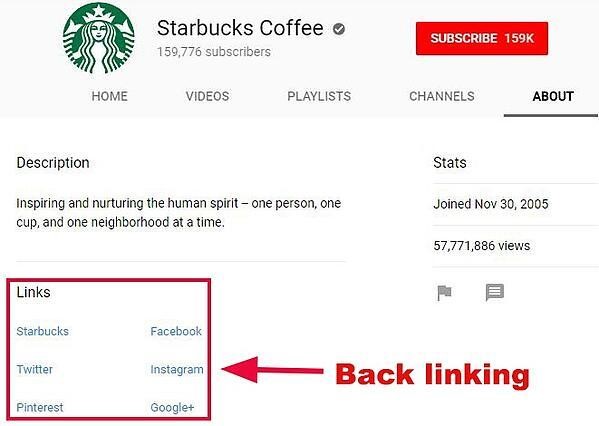
What’s backlinking? Its when you link your Facebook page from your other social media platforms such as Instagram and Twitter as well as your website. As more links from these digital assets connect to your Facebook page, it will rank higher in search engine results.
Link your Facebook page from all other accounts, including your virtual business card and profile.
7. Reviews make a difference
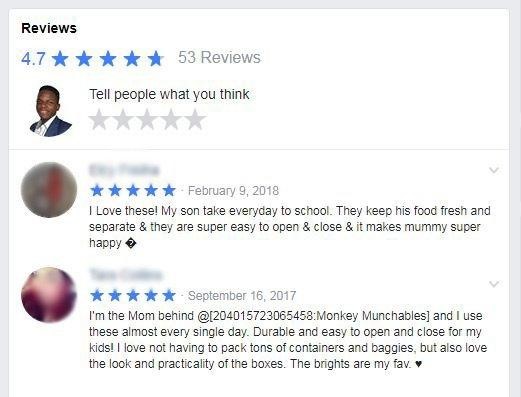
Whether your product is a blockbuster or not, adding reviews to your Facebook page allows you to put a finger on the pulse of your customers. Reviews are the social proof of your credibility and trustworthiness. A study by Bright Local showed that consumers read 7 reviews on an average before buying from a business and 85% of consumers trust them on par with personal recommendations.
Therefore, the more reviews you get, the better it is for your online business. Besides the fact that reviews can actually boost your sales, they also serve to enhance the chances of your page appearing in search engine results.
And the funny thing is that reviews are not too hard to get! Bright Local also pointed out in the same study that 68% of consumers are willing to give a review to a local business. For a small business or a new entrepreneur, reviews can be the game changer.
Enable “Add Review” on your Facebook page to ask your customers to review your product or service.
8. Add visual imagery and more of it
We know we learn much better from videos rather than from a photo or content. It’s a major reason for brands shifting to video ads on Facebook.
A study by Nielsen in collaboration with Facebook showed that the moment a video ad was shown, it immediately increased ad recall, purchase decision and brand awareness.
This lift happened even before one second of the video was played. What this means is that people who didn’t even complete the video were impacted by it. The longer the ad was viewed, the lift increased. Data also showed that even video views less than 10 seconds were effective enough to influence brand awareness and purchase decisions.
The final mind-blowing fact is that people gaze at videos 5 times more than at a static post.
Create shorter videos and measure the value from “Likes”, “Comments” and “Shares”. When creating your video content, keep in mind that the entire video, from the first frame to the last, drives value.
9. Facebook Live
There are several ways to get your message out on your Facebook page – content, images, videos, slideshows, data charts and graphs, etc. But have you ever tried Facebook Live? If you haven’t yet, then we have some very compelling evidence for you.
Of all the various types of posts on Facebook, Live video has been found to have the most impact and reach. To give you a better perspective, firstly, people watch it three times longer, and secondly, the number of comments increases by 10 times when compared to regular video.
One of the advantages of live streaming on Facebook is that the event is placed at the top of the Facebook News Feed and Facebook also sends notifications to your potential audience.
You can also easily either schedule a broadcast or go Live! Just click on the Live Video button.
You can use Facebook Live for product demos, events like product launches, back stories and announcements. Facebook recommends at least 10 minutes of live streaming as the longer you are live for, the higher are the chances of people watching your event.
10. Different time zones need a scheduler
Let’s face it! The moment you take your business online, your customer base becomes global. That brings in different time zones to the equation of when is it most effective to upload your content. It’s a given that the quality of your posts matters a great deal to keep a global audience engaged, but it is not easy to produce top class content twice a day, every day.
And what do you do about people who live in time zones away from you? Take advantage of Facebook’s Post Scheduler.
Create a few posts and customise each one depending on the geography of your audience. Then, queue all the posts by using the “Schedule Post” button. Facebook will automatically display the posts at time slots you assign in the scheduler.
11. Show value first
What does that mean? You can’t just put any content together and post it on Facebook for your viewer to consume. In simple terms, deliver content that is beneficial to your viewer. Check out Dogspot who provide a variety of services like pet day-care, salons and grooming parlours as well as vets under a single roof. They frequently hold Facebook LIVE sessions with experts in their fields for the pure benefit of their viewers. With no sales pitch in these sessions.

A good rule of thumb is to provide value to your viewers, without baiting them, at least twice before you pitch to them. A proper plan in the form of a content calendar will go a long way in keeping your viewers hooked and you prepped.
12. Optimise your Facebook page settings
You can customise almost every aspect of your Facebook business asset to ensure that your audience gets the best look and feel of your brand, product or service. And it’s a good idea to do so, as everything you showcase on Facebook translates into a potential customer touch point. This begins with the name of your Facebook page and runs down to integrating your other social media platforms.
– Here are some best practices we strongly recommend.
– Collect your Vanity URL
– Tab re-ordering based on what the viewer would like to see first
– Shopfront to buy directly from Facebook’s “Shop”
– Offer creation that lets you highlight offers and makes it easier for the viewer to claim
– Events section should get a special mention organically by Facebook based on geography and friends of people who are going
– Connect Instagram feature that lets you moderate posts on Instagram from Facebook
13. Optimise Facebook Messenger
The Facebook Messenger has evolved from a simple messaging application meant for chatting with friends and family to the one that brands use to communicate with their audience. In fact, in our experience has shown that Messenger, not News Feed, offers the opportunities for the best Facebook hacks.
The advent of the omnipresent chatbot erased the need to open apps, call people or online searches. So, if you still haven’t customised Messenger to work for you, let’s do it right away!
Instant Replies
In our real-time world, quick responses are the order of the day. But what if you are not online? That query or purchase decision could go unnoticed for a considerable period of time and may turn off your customer. Not any longer!
You can use Facebook’s Response Assistant so that your customers always receive a response whether you are online or not. The Response Assistant will send a greeting text if someone is about to send a message to you. This text can also be customised to send instant responses to incoming messages. Here’s how to do it:
1. Go to your Facebook Page Settings
2. From the menu on the left, select “Messaging”
3. Scroll to Response Assistant
4. Use the toggle switches to turn on “Yes” for “Send Instant Replies to anyone who messages your Page” or turn on “Yes” for “Show a Messenger Greeting”
5. Click “Change”
6. Write your message(s) appropriately
7. Click “Save”
Calibrating your AWAY messages
Facebook actually has a rating scale to let visitors know how quickly you respond. And you want that rating to be as high as possible, green being the highest, implying “Very responsive to messages”.
But it’s also not possible to be on Messenger all the time. Somebody’s got to run the business too?! So here’s how to make Messenger work for you.
1. Go to your Facebook Page Settings
2. From the menu on the left, select “Messaging”
3. Under Response Assistant, use the toggle switch to turn on “Yes” for “Stay responsive when you can’t get to your computer or phone”
4. Click “Change”
5. Now, write a message which will inform the user an approximate duration to wait for your response
6. Click “Save”
7. Under “Stay responsive when you can’t get to your computer or phone”, click “Change”
8. Then, click ”Schedule”
9. Choose your time zone and click “Add Time”
10. Enter the times when you will be away from Messenger
11. Click “Save”
Some Messages Need to be Responded to Privately
Of course, more conversations around your page are great to show community engagement. But it’s also equally true that not all conversations have to be in the public domain. Issues related to customer complaints or order fulfilments are best dealt in private.
So, click “Message” instead of “Reply” under the original post. You can now deal with the situation privately on Messenger and at the same time a public notification will announce that you have responded privately. This helps to let people feel that you are ignoring or not responding.
Launch Your Own Bot!
Chatbots are a very handy automated tool. They can book hotel reservations, answer specific questions, bring up your favourite playlist and the list goes on! Chatbots may not always be necessary for a business, but there’s enough to consider whether a bot could help your brand to answer product or service related questions.
If you don’t know how to code one, then rest easy as there are many resources online which you can use to build your own.
Use Messenger to Sell
Thus far, you have set up your Facebook Messenger to respond to basic queries regarding your brand and to deal with customer service. But did you know that you can also sell on Messenger?
When you use paid ads or sponsored messages, you can send them to anyone who has an open chat with you. So, even as you are responding, you can send an ad to the person to let them know about a new update or value-add. People who subscribe to your Messenger are like the entries of your email list to whom you can send new information, do surveys and give glimpses of your new promotions, among others.
In Conclusion:
As we step into 2021, with more and more businesses going digital its almost critical for business to leverage social media platforms in all their glory. Globally, thousands of businesses rely on their Facebook page to promote their business and generate sales. It’s a no – brainer that a well optimised Facebook Business page can be very useful to grow your brand’s reputation and profitability. If you’re not doing it already, start today. If you are, ensure you’re getting to use all its features to your advantage.
Have you tried any of these hacks before? Did it work for you? Let us know in the comments below.